
Reading time: ~8 minutes.
Every D365 Finance & Operations developer writes Chain of Command code. Most write it wrong for the first six months. Not broken wrong — the code compiles and usually runs — but wrong in the ways that matter later: brittle under upgrades, confusing for the next consultant, silently slowing down batch processes, or wrapping methods that should never have been wrapped at all.
This is a field guide, not a syntax tutorial. Microsoft’s documentation covers the syntax well (linked at the bottom). What the docs don’t cover is the decision — when CoC is the right tool, when it’s the wrong tool, and what tends to bite you in production.
What CoC actually is (the one-minute version)
Chain of Command is Microsoft’s supported way to inject custom logic into standard F&O methods without modifying Microsoft’s source code. You write an extension class, mark it with [ExtensionOf(…)], redeclare the method with the same signature, and call next to invoke the base implementation (and any other extensions in the chain).
[ExtensionOf(tableStr(SalesTable))]
final class SalesTable_MyExt_Extension
{
    public void update()
    {
        SalesShippingDate origDeliveryDate = this.DeliveryDate;
        next update();  // runs the base method + any other extensions
        if (this.DeliveryDate != origDeliveryDate)
        {
            warning("Delivery date changed. Confirm the new date is attainable.");
        }
    }
} 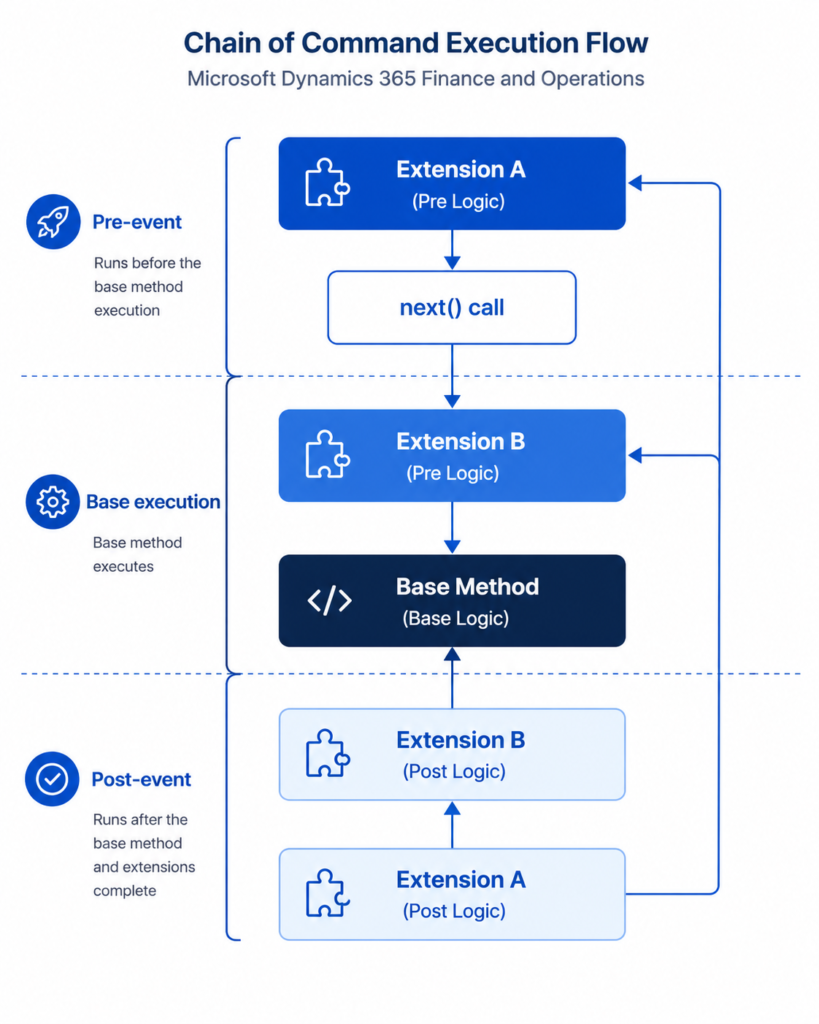
The code before next runs as a pre-event. The code after next runs as a post-event. enVista’s writeup of the SalesTable.update() case is the cleanest worked example of this pattern I’ve come across.
A few non-negotiable rules, straight from Microsoft:
- The extension class must be marked final and end in _Extension.
- The call to next must be at the top level of the method body. You cannot put it inside an if, a while, a for, or a logical expression. (As of Platform Update 21, wrapping next inside try/catch/finally is allowed.)
- The extension must be in a package that references the model where the base class lives.
- Default parameter values are declared on the base method, not repeated in the extension. If the base is salute(str message = “Hi”), your extension signature is salute(str message).
These aren’t style suggestions. The compiler enforces them.
The mental model: CoC is a wrapper, not a fork
The single biggest conceptual mistake new F&O developers make is treating CoC like they’re subclassing the base method. They’re not. They’re wrapping it. The base method will still run. Any other extension in the chain will also run. And — this is the part that surprises people — the order in which extensions are called is not guaranteed.
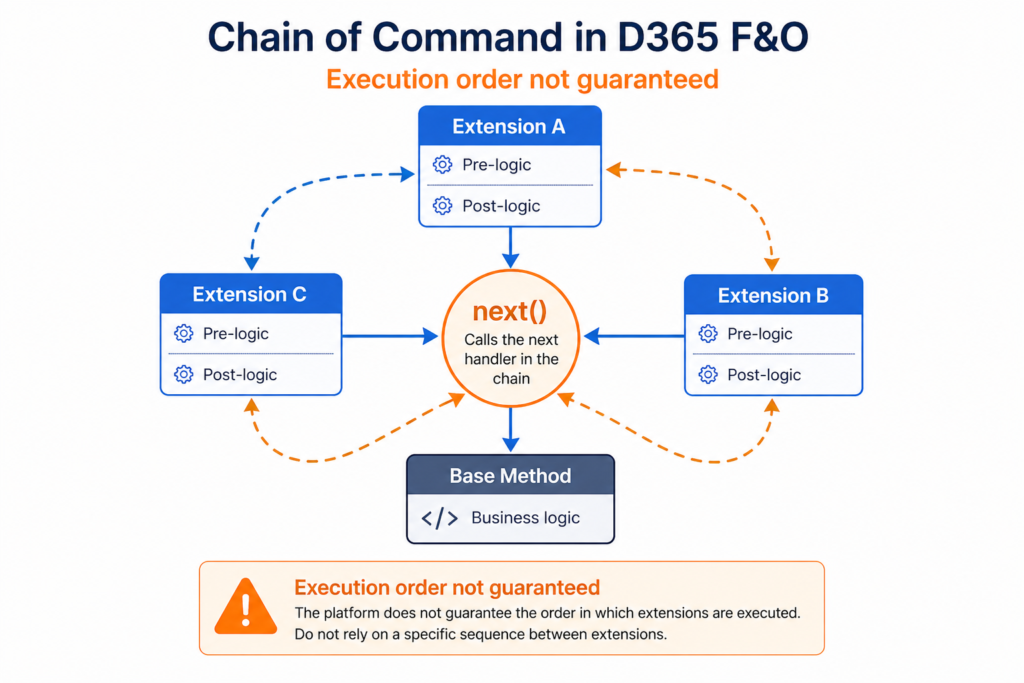
From Microsoft Learn, emphasis mine: “When the call to the next method occurs, the system randomly picks another method in the CoC. If no more wrapped methods exist, the system calls the original implementation.”
What this means practically: if your logic depends on running before or after another ISV’s extension of the same method, you are in undefined territory. Don’t design that way. Design so your extension is order-independent. This is the rule that saves you the most pain at upgrade time.
When CoC is the right tool
Reach for CoC when:
1. You need to modify the behavior of a specific public or protected method. The classic case: validate something extra on SalesLine.validateWrite(), or inject logic into CustTable.delete().
2. You need access to protected members of the base class. This is CoC’s real superpower over event handlers. Pre/post event handlers cannot see protected fields or methods. CoC can. If the logic you need to add requires inspecting this.someProtectedField, CoC is your only clean option.
3. You need your logic to run in the same transaction scope as the base method. Event handlers run in a slightly different context; CoC runs inside the method’s own call frame. If you’re doing anything transactional — inserting child records, working with ttsbegin/ttscommit-dependent logic — CoC keeps you inside the right boundary.
4. You want to conditionally change the return value or parameters. You can mutate the returned value after next, or adjust arguments before next. Event handlers can’t cleanly do this.
5. Readability matters. A CoC extension sits next to the method it modifies and reads top-to-bottom. A pre/post event handler pair is two static methods somewhere else in your project, joined only by an attribute. For the developer who inherits your code two years from now, CoC is usually kinder.
When NOT to use CoC
Here is where most of the production pain comes from. CoC is the wrong tool when:
1. You need to react to a method you can’t or shouldn’t wrap. Methods marked [Hookable(false)] can’t be wrapped. Methods on extension classes themselves can’t yet be wrapped (Microsoft has said this is planned). Methods marked final without [Wrappable(true)] can’t be wrapped. In all these cases you’ll need a pre/post event handler, a delegate subscriber, or a redesign.
2. You need multiple independent handlers. CoC lets multiple extensions wrap the same method, but each one must be in a separate extension class, and — again — the order is random. If what you actually have is three genuinely independent reactions to the same event (“log it,” “notify finance,” “push to the integration queue”), three event handlers express that intent more clearly than three CoC extensions competing on the same method.
3. The method is performance-critical and called in a tight loop. Every wrapper adds a call frame. Usually this is irrelevant. But if you’re wrapping something like an inventory-settlement method that fires tens of thousands of times during month-end inventory close, even small per-call overhead compounds. ⚠ Benchmark before wrapping hot-path methods. A seemingly innocent CoC on a frequently-called table method can add minutes to a close run.
4. You only need to react to a framework event, not override method logic. Form OnInitialized, data event OnInserting, menu item clicks — these are not method overrides, they’re events. Use event handlers. CoC doesn’t apply.
5. You are tempted to not call next. There are narrow cases where Microsoft marks a method [Replaceable] and you are intentionally allowed to skip next. Outside those, if you find yourself wanting to skip next to “prevent” the base behavior, stop. You are fighting the framework. Upgrades will punish you. Find another approach — a different extension point, a different business process, or a conversation with the functional consultant about whether the requirement is real.
The gotchas that bite in production
A short list of issues that come up repeatedly on F&O projects:
Form-nested CoC needs a separate extension class per nested concept. You can’t put a data source CoC and a control CoC in the same extension class. Each needs its own [ExtensionOf(formdatasourcestr(…))] or [ExtensionOf(formcontrolstr(…))] class. First-timers try to cram them together and the compiler silently ignores the wrong ones.
The random-order behavior will eventually cause a bug you can’t reproduce locally. If two ISVs both extend the same method and one of them silently assumes it runs first, you’ll see a bug in one environment and not another. The fix is to design for order-independence. When you inherit someone else’s non-order-independent code, the only pragmatic options are to move the logic to a different extension point, or coordinate directly with the ISV. ⚠ This is the most painful CoC issue on multi-ISV projects.
Kernel-implemented methods on tables and data entities weren’t wrappable before Platform Update 22. Before PU22, if you tried to wrap insert() or doInsert() through CoC you’d either get a compile error or silently different behavior depending on the platform version. Confirm your platform version if you’re relying on wrapping these. ⚠
Extensions must be on regular classes, not extensions of extensions. You can’t wrap a method defined inside another extension class. That capability is on Microsoft’s roadmap but not shipped as of this writing.
CoC vs Event Handlers: the decision in one table
| Situation | Use |
| Override the logic of a public/protected method | CoC |
| Need access to protected fields/methods of base | CoC |
| Need to change return value or parameters | CoC |
| Pure pre-or-post logging / notification | Either — event handler often clearer |
| Multiple independent reactions to same event | Event handlers |
| Framework event (form init, data event, menu click) | Event handler |
| Method is [Hookable(false)] or sealed final | Event handler, if available, else redesign |
| A Microsoft-provided delegate exists | Delegate subscriber |
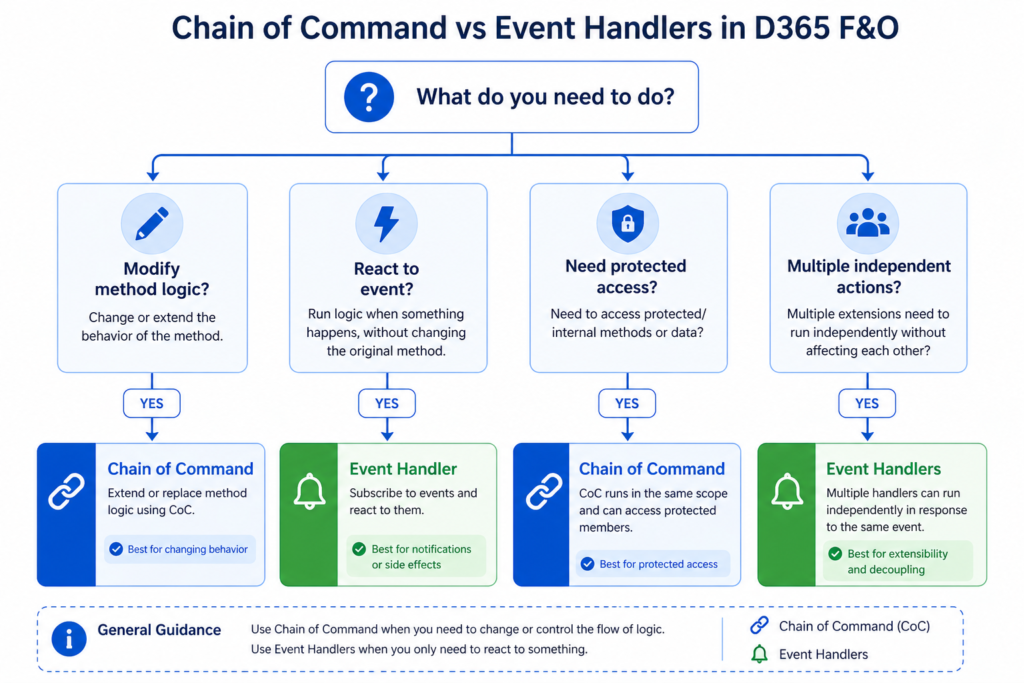
What to actually do
If you’re new to F&O development and learning CoC right now, the shortest honest advice:
- Default to CoC for method-logic overrides. It’s the pattern Microsoft is investing in, it reads better, and it’s more powerful.
- Default to event handlers for framework events and for “I just want to react when X happens” logic.
- Always assume your extension is not the only one on a method. Write for order-independence.
- Before wrapping a hot-path method, benchmark. A fraction-of-a-millisecond overhead in an inventory close is a real problem.
- Read the Microsoft Learn page on method wrapping all the way through, including the restrictions section. Most CoC bugs trace back to ignoring the rules on next.
References
- Microsoft Learn — Class extension: Method wrapping and Chain of Command (learn.microsoft.com/en-us/dynamics365/fin-ops-core/dev-itpro/extensibility/method-wrapping-coc). Authoritative reference. Covers syntax, restrictions, wrappable/hookable attributes, form-nested extensions, and platform update history.
- Sertan Yaman — AX7 (D365) Chain of Command with Examples (devblog.sertanyaman.com/2017/11/15/ax7-d365-chain-of-command-with-example/). The clearest working demonstration of CoC’s random-order behavior and how it interacts with pre/post event handlers on the same method.
- enVista — D365 Development: X++ Language Chain of Command Examples (envistacorp.com/blog/x-language-chain-of-command). Good SalesTable.update() worked example used as inspiration for the snippet above.
- Dynamics Edge — Chain of Command D365 Fundamentals Training (dynamicsedge.com/chain-of-command-d365-fundamentals-training-aug-2025/). Useful for the Platform Update 21 (try/catch/finally around next) and Platform Update 22 (wrapping kernel-implemented table methods) enhancements.
- Stoneridge Software — Using the Chain of Command feature in X++ (stoneridgesoftware.com/using-the-new-chain-of-command-feature-in-x/). Introductory-level overview; good first read for developers new to the concept.
- Dynamics 365 Musings — Chain Of Command In D365 Fundamentals (dynamics365musings.com/chain-of-command-in-d365/). Developer perspective on readability of CoC vs event handlers.
- Docentric — How to Skip Next in CoC of a Method in X++ (ax.docentric.com/how-to-skip-next-in-coc-of-a-method-in-xpp/). Original writeup of the try/catch with Exception::UpdateConflict hack. Explicitly warns the loophole may close in future updates.
- Flixelius — How to skip ‘Next’ in a CoC Method in X++ (flixelius.de). Worked example of the skip-next hack on CustTable.validateWrite(), including the transaction-exception reasoning.
- Microsoft Learn — X++ exception handling (learn.microsoft.com/en-us/dynamics365/fin-ops-core/dev-itpro/dev-ref/xpp-exceptions). Explains why Exception::UpdateConflict and DuplicateKeyException behave differently from Exception::Error inside transactions — the foundation of why the skip-next hack works.
3 tricky interview questions (with verified answers)
These come up in real F&O developer interviews. Each answer is grounded in Microsoft’s own documentation and named community sources — no guesswork. Sources are linked in the References.
Q1. Can you skip the next call in a CoC extension?
Short answer: yes, in three different ways, with very different consequences.
1. The sanctioned way — if the base method is marked [Replaceable], the compiler does not require you to call next. Microsoft explicitly designed this attribute so that extenders can fully override the base logic. This is the only clean, upgrade-safe way to skip next. Even here, the recommended practice is to skip conditionally — you still want the base behaviour in most cases.
2. The compiler-enforced default — for methods not marked [Replaceable], the compiler forces next at the top level of the method body. You cannot place it inside an if, while, for, do-while, or a logical expression. A return cannot precede it. This is by design.
3. The known community hack (Platform Update 21+) — place next inside a try/catch block where the catch is only entered when a specific exception is thrown. The compiler accepts this because PU21 officially allows next inside try/catch/finally. The exception of choice is Exception::UpdateConflict — not Exception::Error — because UpdateConflict and DuplicateKeyException are two of the very few exception types that can be caught inside a ttsBegin/ttsCommit transaction block. Regular Exception::Error bubbles out of transactions and can’t be caught locally.
⚠ Important: the hack in option 3 is a loophole, not a feature. Docentric, who originally published it, explicitly warns not to rely on it — Microsoft could change the behaviour of next or exception handling in any future platform update. Use it only when the method is truly unwrappable any other way, and document why you did it.
Q2. If two ISVs both extend the same method using CoC, whose extension runs first?
Trick question. The answer is: undefined. Microsoft’s documentation is explicit on this:
“The system randomly runs one of these methods. When the call to the next method occurs, the system randomly picks another method in the CoC. If no more wrapped methods exist, the system calls the original implementation.”
You cannot design for execution order. Writing extensions that silently depend on running before or after another party’s extension is one of the most painful bugs to find, because the failure will reproduce in one environment and not another.
The three real options when order matters:
- Redesign the extension to be order-independent. This is almost always possible and is the right answer in interviews.
- Move the logic to a different extension point where order is controlled — a Microsoft-provided delegate, or a pre/post event handler where you at least know the phase.
- Coordinate directly with the other ISV to split responsibility cleanly. Rare, but sometimes the only path.
Q3. What’s the difference between [Hookable(false)] and [Wrappable(false)]?
This one trips up experienced developers. The two attributes look similar and they are not the same.
[Hookable(false)] — blocks both pre/post event handlers and CoC wrapping. The method is completely sealed for extension. No way in.
[Wrappable(false)] — blocks CoC wrapping only. Event handlers still work. This is a finer-grained lock.
[Wrappable(true)] — the inverse escape hatch. Applied to a final method, it overrides the default “final methods can’t be wrapped” rule and allows CoC.
[Hookable(true)] — and here is the trap. This attribute only applies to pre/post handlers. It does not influence whether CoC wrapping is allowed. A senior developer who assumes [Hookable(true)] makes a method CoC-wrappable will be wrong.
All four of these are explicitly documented on the Microsoft Learn page cited below.
Next up in this series: Event Handlers vs Chain of Command — The Real Decision Framework for 2026. We’ll take the decision table above and stress-test it against real project scenarios.
