CLOUDCLIF – Blogs
  • Home
  • D365 F&O
  • Work Flows
  • Reports
  • Enterprise Portal
Category:

D365 F&O

D365 F&O

Delegates in X++: The Underused Pattern for Clean Extensibility 

by Muhammad Salman Siddiqui April 30, 2026

Reading time: ~8 minutes. 

Delegates are the cleanest extension mechanism in X++. They are also the least taught. Most F&O developers reach for CoC or event handlers first, write working code, and never seriously consider whether a delegate would have been the better answer — or whether the situation called for publishing one of their own. This post is about both halves: subscribing to delegates that already exist, and writing delegates in your own code so other extensions can plug in cleanly. 

If you haven’t read the foundation posts: CoC mechanics Chain of Command in D365 F&O, events vs CoC Event Handlers vs Chain of Command. 

What a delegate actually is 
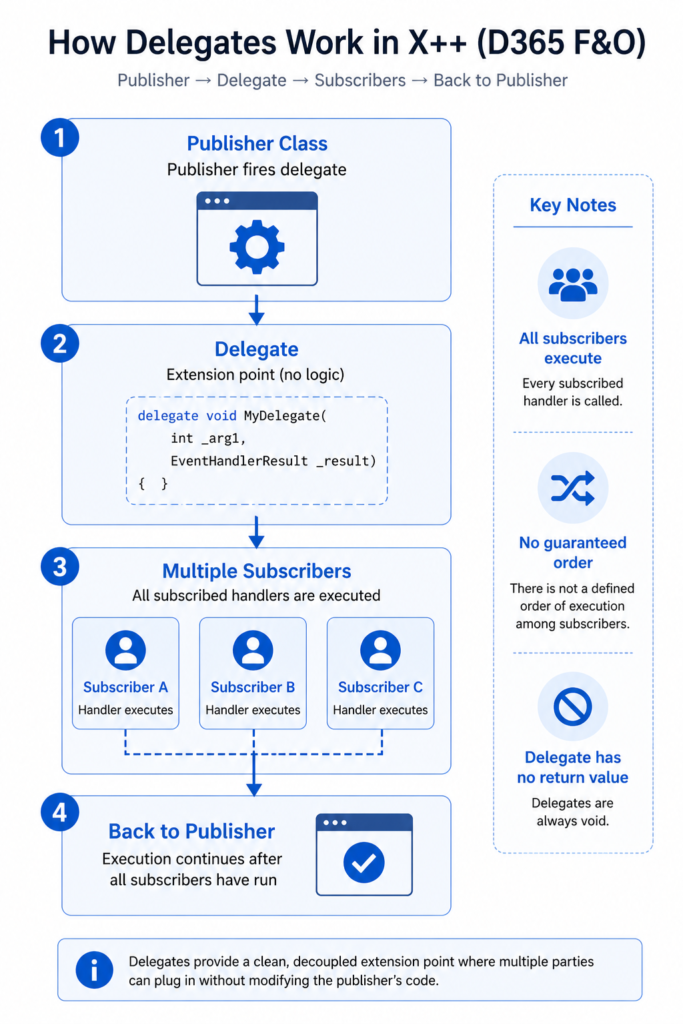
A delegate in X++ is a method declaration whose body is empty by design. The publisher of the delegate isn’t writing logic — they’re declaring an extension point. When code execution reaches the call site, the delegate fires, every subscriber’s handler runs, and execution continues. 

Microsoft Learn’s Events and delegates reference shows the canonical shape: 

// In the publisher class — declares the extension point 
delegate void RentalTransactionAboutTobeFinalizedEvent( 
    FMRental fmRentalRecord, struct RentalConfirmation) 
{ 
} 
// In a subscriber class — handles the event when it fires 
[SubscribesTo( 
    classstr(FMRentalCheckoutProcessor), 
    delegatestr(FMRentalCheckoutProcessor, RentalTransactionAboutTobeFinalizedEvent))] 

public static void RentalFinalizedEventHandler( 
    FMRental rentalRecord, Struct rentalConfirmation) 
{ 
    // your custom logic runs when the publisher fires the delegate 
} 

Two non-obvious things on that snippet. First, the delegate’s body is empty — that’s not a stub, it’s the entire definition. Second, delegates always have void return type. Microsoft is explicit on this in the migration-delegates reference: “delegates do not have a return value, an EventHandlerResult is passed as a parameter to provide access to the needed result value after the delegate has returned.” That void-only rule shapes everything about how delegates carry information back to their caller — covered in the next section. 

EventHandlerResult — how a delegate returns a value without returning a value 
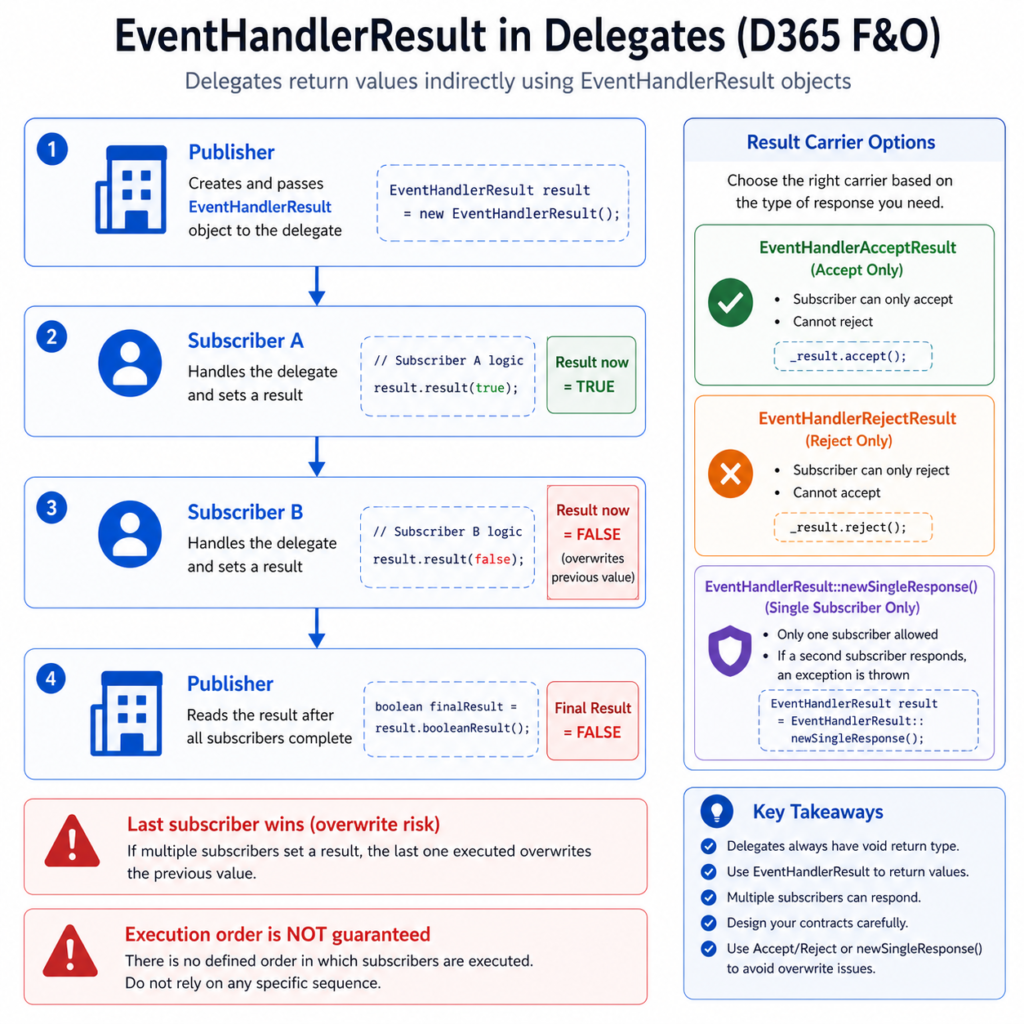
Because delegates can’t return values directly, the publisher passes a result-carrier object as a parameter. Subscribers populate it; the publisher reads it after the delegate fires. The pattern is documented across Microsoft Learn’s Respond by using EventHandlerResult and EventHandlerResult classes references.

The carrier comes in three flavours, all from the platform: 

  • EventHandlerResult — generic; subscriber calls _result.result(value) to set whatever value type matches the agreed contract. 
  • EventHandlerAcceptResult — restricted to accept-only signalling; subscriber calls _result.accept(). You cannot reject through this type. 
  • EventHandlerRejectResult — the inverse, restricted to _result.reject(). You cannot accept. 

Why three? Because delegates can have multiple subscribers, and one subscriber can overwrite another’s result. Microsoft Learn’s EventHandlerResult page describes the problem directly: “If the response is gathered by using an EventHandlerResult object, the second subscriber that validates and replies with Boolean true might overwrite the Boolean false from the first subscriber.” The accept-only and reject-only types narrow what each subscriber can express, which makes the multi-subscriber case behave more predictably. 

There’s also a stricter mechanism: EventHandlerResult::newSingleResponse(). When the publisher instantiates the result this way, the framework throws an exception as soon as a second subscriber tries to provide a result. This is the right choice when the publisher genuinely needs at most one subscriber to answer — overlapping ISVs becomes a fail-fast scenario instead of a silent overwrite. 

Three legitimate uses of delegates 

Delegates are general-purpose, but in practice they get used for three distinct things. Recognizing which one you’re doing matters because the contract you publish should match the intent. 

1. Notify-only — “this just happened”. The publisher fires the delegate to tell anyone listening that something occurred. No response expected. No EventHandlerResult parameter. Subscribers can do whatever they want — log it, push it elsewhere, ignore it. This is the cleanest contract: the publisher is genuinely indifferent to subscriber behaviour. 

2. Request-and-respond — “someone please answer this”. The publisher needs information that subscribers might supply. The delegate signature includes an EventHandlerResult-family parameter. The publisher reads the result after the delegate fires. This is the pattern in Microsoft Learn’s InventWarehouseEntity validateWarehouseTypeDelegate example. Use this when the answer might depend on logic the publisher can’t reasonably know. 

3. Request-and-reject — “please veto this if you have a reason”. Specialized version of #2 using EventHandlerRejectResult. The publisher proceeds unless a subscriber rejects. Useful for plug-in validation: any subscriber can block, none has to say yes. 

The pattern Microsoft tells you not to write 

Microsoft Learn’s EventHandlerResult page has an unusually direct warning, with a code example labelled “This example is an example of code that you should not write.” Worth reading in full because it’s the single most-broken delegate pattern on real projects. 

Microsoft’s exact words: “Before the subscribing logic responds, it should not evaluate whether the result object parameter already contains a result.” 

Rephrased: don’t write a subscriber that does “if some other subscriber already answered, I’ll skip”. Don’t write one that does “if no one else answered, I’ll provide a default”. Either of those couples your subscriber to the assumed behaviour of other subscribers, which you don’t control and shouldn’t reason about. 

The correct shape: each subscriber answers if and only if its own conditions are met. Each subscriber’s logic stays self-contained. The framework — or the newSingleResponse constructor — handles what happens when multiple subscribers try to answer. Don’t write defensive code against the multi-subscriber case in your own subscriber. That’s the framework’s responsibility. 

When to publish your own delegate 
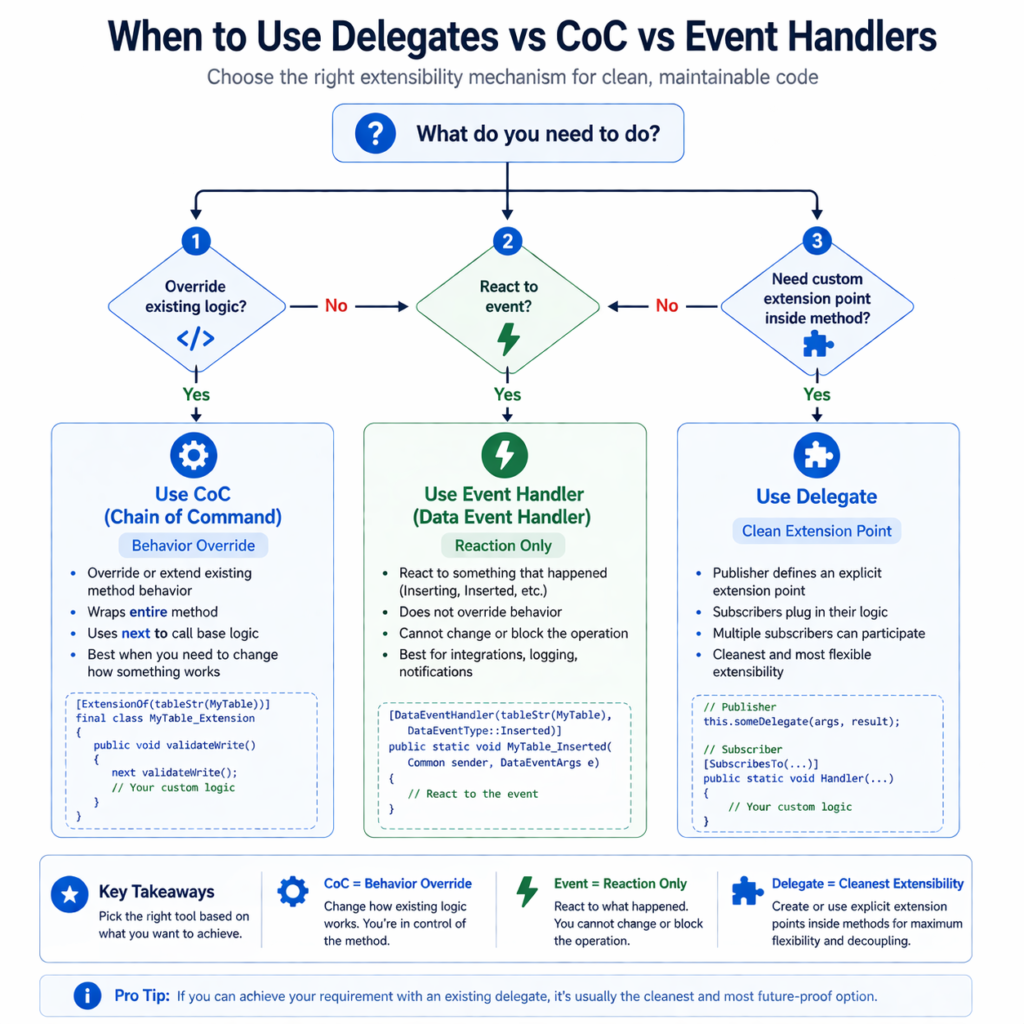
Most discussion of delegates focuses on subscribing — finding a Microsoft delegate that fires near the point you need to extend, and hooking into it. But the more interesting question is when to publish one in your own code. 

Publish a delegate when: 

  • You’re writing code that other extensions will want to plug into. ISV solutions, partner-published frameworks, internal libraries used across multiple projects — all need explicit extension points. 
  • The right extension point is in the middle of a method, not before or after it. CoC and Pre/Post handlers can only wrap whole methods; if subscribers need to intervene at a specific point inside the method, a delegate fired from that point is the only clean answer. 
  • You want the contract to be discoverable. A published delegate shows up in tooling and code searches as an explicit extension point, more visible than an internal method waiting for someone to CoC it. 
  • You want forward-compatibility. Microsoft can change a method’s internal logic across versions; a delegate fired from inside that method is a stable contract you’ve made with subscribers, decoupled from the implementation around it. 
  • Don’t publish a delegate when: 
  • There’s already a Microsoft delegate firing close to the same point. Two delegates means subscribers have to know which to subscribe to. 
  • The right answer is a method override. If subscribers genuinely need to replace your method’s behaviour, CoC on a public method is the cleaner path. 
  • You’re tempted to fire one as a notification just so subscribers can read state. Refactor that state into a public read-only property instead. 

3 tricky interview questions (with verified answers) 

Q1. A delegate has the signature delegate void myDelegate(int x, EventHandlerResult result). Two subscribers respond. What value does the publisher see? 

Whatever the second subscriber set — last write wins. Microsoft Learn’s EventHandlerResult page is explicit: “the EventHandlerResult class can only contain a single result. If multiple subscribers provide their individual results, the last respondent wins and overwrites the results from the previous subscribers.” Worse, you can’t predict which subscriber runs second — there’s no guaranteed sequence. “There is not a defined order in the processing of handler methods”, per Microsoft’s delegates-migration reference. The fix is either to design the contract so only one subscriber can plausibly respond (use EventHandlerAcceptResult or EventHandlerRejectResult to constrain the response), or use EventHandlerResult::newSingleResponse() to get a fail-fast exception when more than one subscriber answers. 

Q2. Can a delegate have a non-void return type? 

No. “Delegates in X++ must have the return type void” — Docentric’s delegates and event handlers writeup states this directly, and Microsoft Learn’s solve-dependencies-with-delegates reference confirms “due to the fact that delegates do not have a return value, an EventHandlerResult is passed as a parameter to provide access to the needed result value.” A candidate who tries to declare delegate boolean myDelegate(…) is showing they haven’t actually written a delegate before. The right pattern is the EventHandlerResult parameter. 

Q3. Should a delegate handler check whether result.result() is already populated before responding? 

No, and Microsoft Learn explicitly labels this as bad practice. The exact words: “Before the subscribing logic responds, it should not evaluate whether the result object parameter already contains a result.” Each subscriber should answer based on its own conditions, independently of whether other subscribers have answered. Coupling your subscriber to other subscribers’ behaviour is a fragile dependency you don’t control. The framework manages multi-subscriber contention via EventHandlerAcceptResult, EventHandlerRejectResult, or newSingleResponse. A senior candidate adds: if a delegate handler in production code is doing this check, it’s a signal the contract is ill-defined and should be redesigned, not patched. 

What to actually do 

  1. Before reaching for CoC on an internal Microsoft method, search the area for an existing delegate. Microsoft has published many in posting, validation, and pricing flows specifically to provide cleaner extension points. Right-click a class name in Visual Studio and use “Find references” to surface delegates and SubscribesTo handlers in that area. 
  1. When you do subscribe to a delegate, write each handler self-contained. Don’t check whether other subscribers already answered. Don’t provide a default for the multi-subscriber case. Each handler responds based on its own conditions only. 
  1. When the contract genuinely needs at most one subscriber, use EventHandlerResult::newSingleResponse() in the publisher. Fail-fast on contention beats silent overwrites. 
  1. When publishing your own delegates in framework or ISV code, prefer EventHandlerAcceptResult or EventHandlerRejectResult over generic EventHandlerResult when the response is binary. The narrower type prevents whole classes of multi-subscriber confusion. 
  1. Treat published delegates as part of your public API. Renaming, signature changes, or removal will break every subscriber. The same compatibility discipline you’d apply to a public class method applies. 

References 

  • Microsoft Learn — Events and delegates (learn.microsoft.com/en-us/dynamics365/fin-ops-core/dev-itpro/dev-ref/xpp-events). Authoritative reference for delegate syntax, the SubscribesTo attribute, and the FMRentalCheckoutProcessor example used above. Last updated February 2025. 
  • Microsoft Learn — Respond by using EventHandlerResult (learn.microsoft.com/en-us/dynamics365/fin-ops-core/dev-itpro/extensibility/respond-event-handler-result). Source for the explicit “do not write this” warning and the InventWarehouseEntity validateWarehouseTypeDelegate example. Last updated May 2025. 
  • Microsoft Learn — EventHandlerResult classes in request or response scenarios (learn.microsoft.com/en-us/dynamics365/fin-ops-core/dev-itpro/dev-tools/event-handler-result-class). Source for EventHandlerAcceptResult, EventHandlerRejectResult, and newSingleResponse. Documents the last-write-wins behaviour. 
  • Microsoft Learn — Solve dependencies among models by using delegates during code migration (learn.microsoft.com/en-us/dynamics365/fin-ops-core/dev-itpro/migration-upgrade/delegates-migration). Source for the void-return-type rule and the no-defined-order statement on subscriber processing. 
  • Docentric — Delegates and Event Handlers in D365FO (ax.docentric.com/delegates-and-event-handlers-in-d365fo/). Best community-level explanation of when to use delegates vs other extension mechanisms; covers EventHandlerResult patterns with current syntax. Updated February 2026. 

Next up in this series: Best Practice Checks — Fighting the Warnings You’ll Actually See in Every Build. [PASTE DAY 7 URL HERE] 
April 30, 2026 0 comments
0 FacebookTwitterPinterestLinkedinWhatsappEmail
D365 F&O

Table Extensions vs CoC on Tables: Picking the Right Tool for Adding Fields and Logic 

by Muhammad Salman Siddiqui April 30, 2026

Reading time: ~9 minutes. 

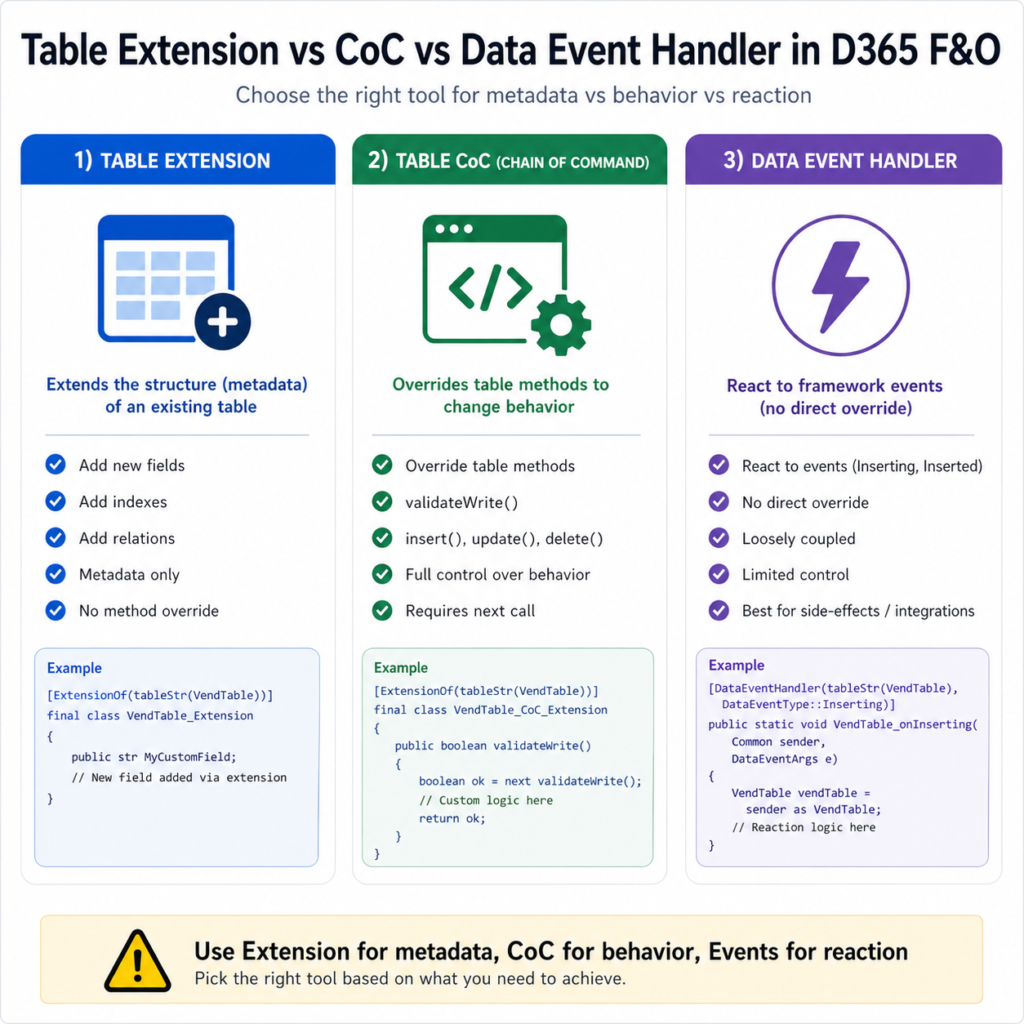
Most table customization in D365 F&O is one of two things: you’re adding a field, or you’re changing how the table behaves on insert, update, validate, or delete. The decision sounds simple — table extension for fields, CoC for logic — and that’s the right shape of the answer. The real question is what to do at the seams. Where does the logic that fills your new field live? When does CoC win, when does it lose to a data event handler? When is the answer actually “a new table, not an extension”? 

This post is the practitioner’s version of that decision. No syntax tutorial — Microsoft Learn covers that. The decision framework is what’s missing from the docs. 

If you haven’t read the foundation posts: CoC mechanics here Chain of Command in D365 F&O, events vs CoC here Event Handlers vs Chain of Command.

The two things you can do with a table extension 

Microsoft’s customization-overlayering-extensions reference is precise about what a table extension is and what it isn’t. A table extension can:

  • Add new fields, field groups, indexes, mappings, and relations 
  • Add new fields to existing field groups 
  • Change the label of a table field 
  • Change the Created By, Created Date Time, Modified By, and Modified Date Time properties 
  • Change the Extended Data Type property on fields, set it to an EDT derived from the current EDT — this has been available since Platform Update 8 

That’s the metadata side. None of these are method overrides. None of them are CoC. A table extension is a metadata change to the table itself — what fields exist, what they’re called, what type they hold. 

Method behaviour is a different mechanism. To change what happens when the table is inserted, updated, validated, or deleted, you write a CoC class on the table: 

[ExtensionOf(tableStr(VendTable))] 
final class VendTable_MyExt_Extension 
{ 
    public boolean validateWrite() 
    { 
        boolean ok = next validateWrite(); 

        if (!ok) return ok; 

        if (this.MyCustomRefId == '') 
        { 
            return checkFailed("@MyExt:RefIdRequired"); 
        } 

        return true; 
    } 
} 

The pattern above follows Forrest Zhang’s VendTable.validateWrite() example on hellosmart.ca — clean current code, no AX-era residue. The key thing to notice: the MyCustomRefId field doesn’t exist on the base VendTable. It exists because of a separate table extension that added it as metadata. Two artifacts, two responsibilities. Both required. 

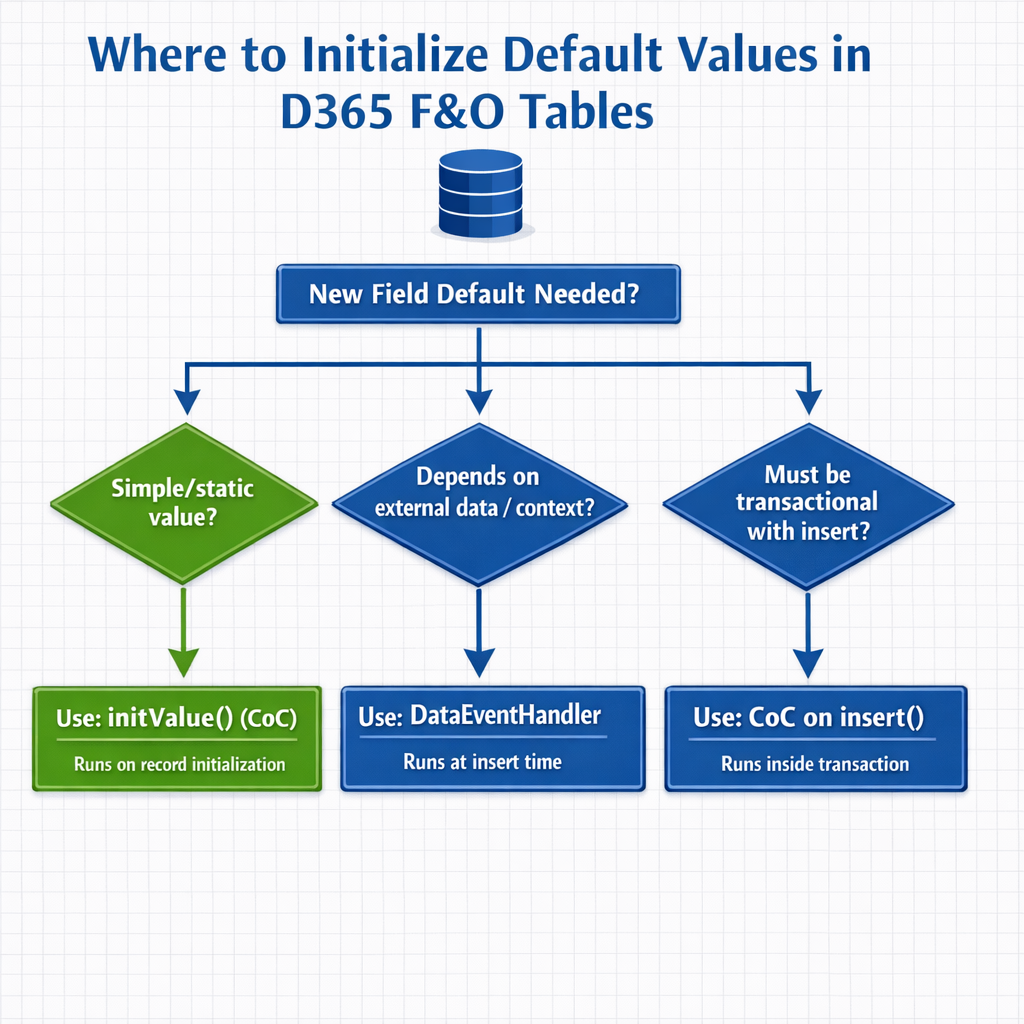
Where the new field’s default value gets initialized — and why it matters 

This is the seam that catches people. You added a field via table extension. You added validateWrite logic via CoC. Now you need that field to have a sensible default value when a new record is created. Where does that logic live? 

There are three plausible places, and they have different consequences. 

Option A: CoC on the table’s initValue() method. Wraps the standard table method that gets called when a new record is initialized in memory. Cleanest answer for most cases. The default lives where developers look for it. 

Option B: A data event handler on Inserting. Microsoft’s documented pattern in their “Add methods to tables through extension” reference uses exactly this approach: a method on a table-augment class fills the new field, called from a DataEventHandler on OnInserting. This works, and is the right answer if the default depends on data that isn’t available until the insert path is reached. 

Option C: CoC on insert(). Now that table CoC supports kernel-implemented methods, you can wrap insert() directly. Use this when you need transactional logic — operations that must be in the same transaction as the row insert itself. 

The decision rule: 

  • If the default is a static value or simple expression based on the record itself — use initValue() CoC. 
  • If the default depends on lookups or context that’s only available at the point of insert — use a DataEventHandler on Inserting, as Microsoft’s reference shows. 
  • If the default’s calculation must be transactional with the insert — wrap insert() with CoC. 

Reaching for the wrong option works in UAT and gets weird in production. Initializers that needed to be transactional but were placed on initValue can run before the values they depend on are set. Initializers that should have been on initValue end up duplicated across every insert path. Choose deliberately. 

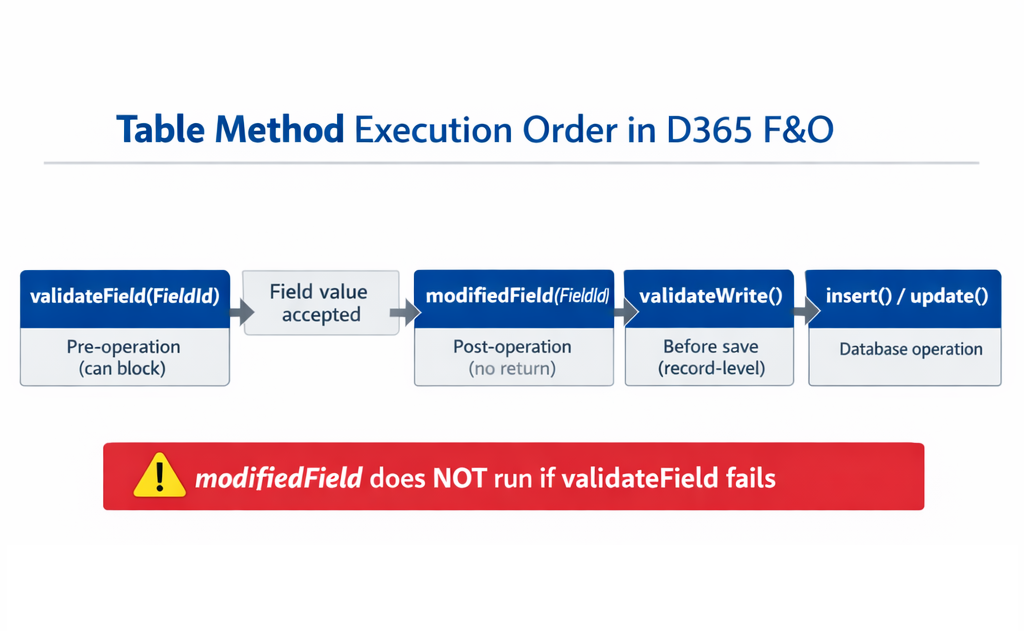
validateField vs validateWrite vs modifiedField — the three confusable methods 

These three table methods get conflated all the time. The distinctions matter, especially when you’re CoC-wrapping them. 

validateField(FieldId) — pre-operation, field-level. Called before a single field’s change is accepted. Returns boolean. Returning false blocks the change. As Forrest Zhang’s hellosmart.ca writeup notes, “validateField is pre-operation: It checks if a field’s new value is valid before allowing the change.” Use for field-by-field validation that should reject the change at the keystroke level. 

modifiedField(FieldId) — post-operation, field-level. Called after a field’s change is accepted. No return value. Use for cascading recalculations of dependent fields. Same source: “If validateField fails, modifiedField never triggers.” That ordering matters when you’re chaining logic across the two. 

validateWrite() — pre-operation, record-level. Called before the record is saved. Returns boolean. Returning false blocks the save. Use for cross-field validation rules that can only be evaluated against the full record. 

There is no validateCreate(). Forrest Zhang flagged this directly: use validateWrite for create-or-update validation, use insert() CoC for create-only logic. People look for validateCreate, get confused when they don’t find it, and end up rewriting validation in three places.

When a table extension is the wrong answer — the field-count problem 

This is the rough paragraph. There’s a soft limit on how many fields you should add to a table via extension before the right answer flips to a separate table joined by relation. 

D365 Smart’s writeup on the table extension framework notes a guideline of 10 fields per extension before you’re encouraged to consider a separate table. The exact number is less important than the underlying reason: every extension field on a Microsoft OOB table becomes a real database column on the actual table. Add fifty fields to InventTable via extension and you’ve fattened the most-joined table in the system. Performance regressions from this are not theoretical. 

The decision flow: 

  1. Adding 1–3 fields with no other ISV churn on the same table — table extension, no concerns. 
  2. Adding 4–10 fields, all closely related to the table’s core purpose — table extension, monitor query plans on the table after deployment. 
  3. Adding more than 10 fields, or fields that represent a different concern (audit metadata, integration tracking, custom workflow state) — strongly consider a separate table joined by relation. The base table stays narrow; the extension data lives where it belongs. 

When you go the separate-table route, you’ll typically have a write() CoC on the form data source ensuring the related table inserts/updates alongside the parent. Chaitu’s 2020 walkthrough on this pattern is the canonical example, though the version-specific details on packed extensions in that post are now standard library functionality and can be ignored. 

Decision matrix: table extension vs table CoC vs data event handler 

What you want to do Table extension Table CoC Data event handler 
Add a new field to a Microsoft OOB table Yes No No 
Add a new index, relation, or field group Yes No No 
Initialize a default value on a new record No Yes — initValue() Yes — Inserting 
Field-level validation that blocks the change No Yes — validateField() Limited 
Record-level validation before save No Yes — validateWrite() No 
Cascading recalculation when a field changes No Yes — modifiedField() No 
Push a message to integration queue on insert No Yes — insert() Yes — Inserted 
Logic that must be in same transaction as insert/update No Yes No — different scope 
Add 30+ fields with distinct concerns Reconsider N/A N/A 

3 tricky interview questions (with verified answers) 

Q1. There’s no validateCreate() on tables. How do you implement create-only validation? 

Two layered answers, both correct: use validateWrite() for general create-or-update validation, and CoC on insert() for logic that must run only on creation. Forrest Zhang’s hellosmart.ca writeup states the rule directly: “Is there validateCreate()? No. Use validateWrite() for create/update; use CoC on insert() for create-only logic.” A senior candidate adds the nuance that validateWrite() is called from both the create and update paths, so checking this.RecId == 0 inside it is the idiomatic way to gate create-only checks without splitting the logic across two methods. 

Q2. What’s the difference between validateField and modifiedField, and what’s the gotcha when you wrap both? 

validateField is pre-operation and returns boolean — false blocks the change. modifiedField is post-operation and has no return value. The gotcha when you CoC both: modifiedField never fires if validateField returns false. So if your modifiedField logic is the cascading-recalc you depend on, and your validateField rejects the change for any reason, the recalc silently doesn’t happen. This isn’t a bug in your CoC — it’s the documented behaviour. Design accordingly: validateField and modifiedField extensions should be coordinated, especially when one is providing the input the other depends on. 

Q3. Why is CoC the recommended approach over event handlers for table-method customization, even though both compile? 

Two technical reasons documented across Microsoft Learn and current community sources. First, kernel-implemented table methods (insert(), update(), delete(), doInsert()) cannot be reached by traditional event handlers — they don’t expose the events that pre/post handlers need. d365ffo.com states this directly: “event handlers in D365FO are designed to respond to events triggered by classes, forms, and controls. However, table methods such as insert(), update(), and delete() do not expose events that can be intercepted by traditional event handlers.” Second, CoC’s signature is compile-time-bound, while event handlers using XppPrePostArgs.getArg(“_paramName”) carry the same brittleness Microsoft warned about in the events reference (see Day 2). The community-current consensus, reflected in Dynamics Edge’s 2025 fundamentals writeup: CoC is the preferred approach for method-logic overrides on tables; event handlers remain valid for Inserting/Inserted-style framework events where they’re the natural fit. 

What to actually do 

  1. For metadata changes (fields, indexes, relations) — table extension. Always. 
  1. For method-level behaviour changes — CoC on the table. Default. Pick the right method (initValue, validateField, validateWrite, modifiedField, insert, update, delete) based on the operation phase you’re hooking. 
  1. For react-to-event work that doesn’t override behaviour — DataEventHandler. Same logic as Day 2’s distinction between method overrides and framework events. 
  1. For more than ~10 new fields with distinct concerns — separate table joined by relation. The OOB table stays narrow. 
  1. Coordinate validateField and modifiedField extensions deliberately. The rejection-blocks-modification chain is documented and easy to be surprised by. 

References 

  • Microsoft Learn — Customize through extension and overlayering (learn.microsoft.com/en-us/dynamics365/fin-ops-core/dev-itpro/extensibility/customization-overlayering-extensions). Authoritative reference for what a table extension can and can’t do; lists fields, field groups, indexes, mappings, relations, label changes, and EDT-derived type changes. Last updated March 2026. 
  • Microsoft Learn — Add methods to tables through extension (learn.microsoft.com/en-us/dynamics365/fin-ops-core/dev-itpro/extensibility/add-method-table). Documented pattern for combining a table-augment class method with a DataEventHandler on Inserting — the basis for Option B in the field-default decision. 
  • Microsoft Learn — Add fields to tables through extension (learn.microsoft.com/en-us/dynamics365/fin-ops-core/dev-itpro/extensibility/add-field-extension). Step-by-step current reference for adding fields via extension. 
  • Forrest Zhang / hellosmart.ca — Understanding Table Methods and Transactions in D365 F&O (hellosmart.ca, September 2025). Source for the validateField/modifiedField ordering rule and the validateCreate clarification used in Q1 and Q2. Current code, current platform, no AX-era residue. 
  • d365ffo.com — Extending the InventSum Table Methods in D365FO: Using Chain of Command Instead of Event Handlers (November 2024). Source for Q3 — explicit on why event handlers don’t reach kernel-implemented table methods. 
  • Dynamics 365 Musings — Chain Of Command For Table Methods in D365 (dynamics365musings.com/chain-of-command-table-methods/). Practical CoC patterns for table methods. Current source. 
  • Dynamics Edge — Chain of Command D365 Fundamentals Training (2025 edition). Useful current confirmation that CoC is now the preferred approach for table-method customization on supported platform versions. 

Next up in this series: Delegates in X++ — The Underused Pattern for Clean Extensibility.

April 30, 2026 0 comments
0 FacebookTwitterPinterestLinkedinWhatsappEmail
D365 F&O

Form Extensions in D365 F&O: Data Sources, Controls, and the Gotchas Nobody Warns You About 

by Muhammad Salman Siddiqui April 29, 2026

Reading time: ~9 minutes. 

Form extensions are where most F&O developers stop reading the Microsoft Learn docs too early. The syntax looks straightforward — slap [ExtensionOf] on a class, name your extension method the same as the base, call next, done. Then you spend an afternoon wondering why your data source extension compiles but never fires, or why your control extension can wrap clicked() but not lookup(), or why element. resolves at compile time but blows up at runtime. This post is the part of the docs they don’t make you read. 

If you haven’t read the earlier posts on the underlying CoC mechanics: Chain of Command in D365 F&O. The decision framework on CoC vs event handlers is here: Event Handlers vs Chain of Command. 

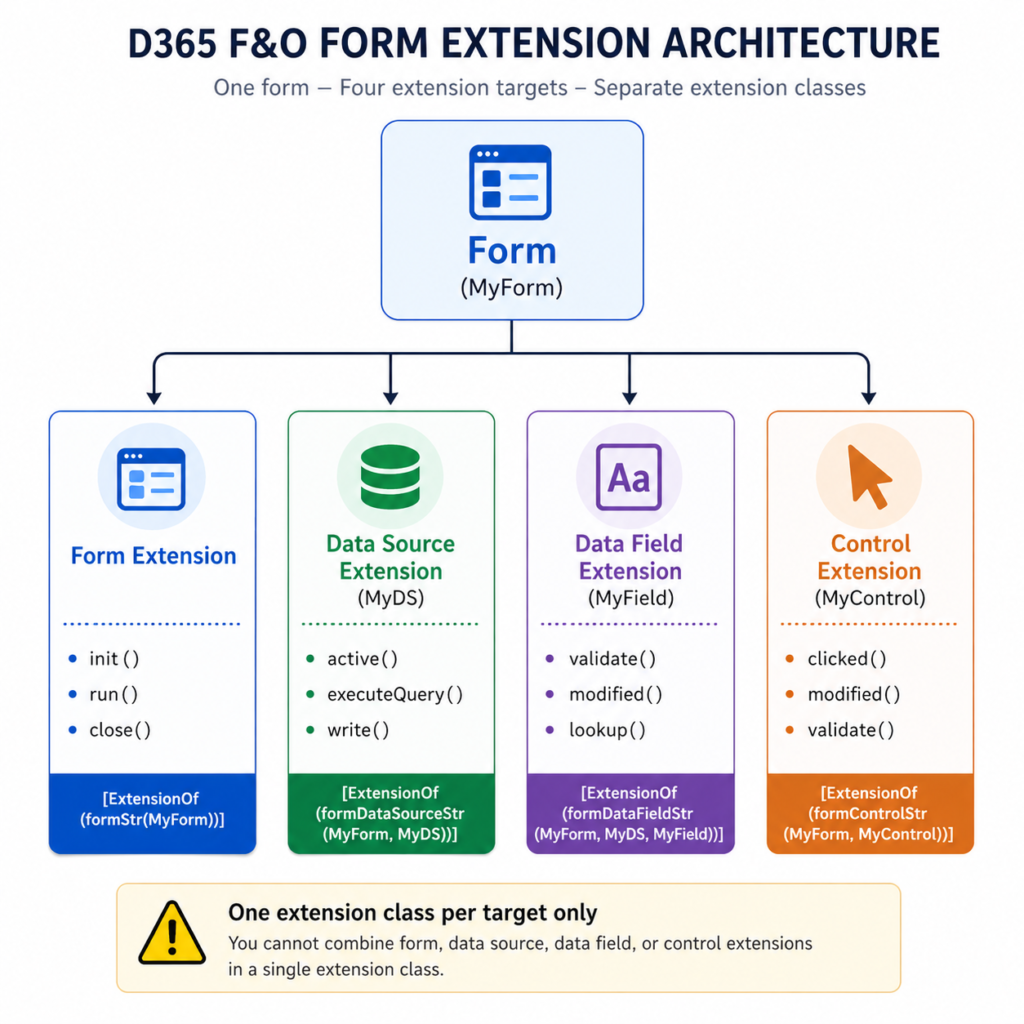
Three extension targets, three separate extension classes 

First rule, easy to violate: a single extension class can target exactly one form artifact. Form, data source, data field, or control — each one is its own [ExtensionOf]. You cannot combine them. Trying to wrap a form-level method and a data source method in the same class either fails to compile or — worse — silently ignores the wrong one. 

The four extension target shapes you’ll write: 

  • [ExtensionOf(formStr(MyForm))] — wraps form-level methods like init, run, close. 
  • [ExtensionOf(formDataSourceStr(MyForm, MyDS))] — wraps data source methods like init, active, executeQuery, validateWrite, write. 
  • [ExtensionOf(formDataFieldStr(MyForm, MyDS, MyField))] — wraps the methods on a specific data field, primarily validate, modified, lookup. 
  • [ExtensionOf(formControlStr(MyForm, MyControl))] — wraps control methods like clicked, modified, validate. 

Microsoft’s method-wrapping reference shows the pattern explicitly. Worth quoting because the next bit catches people: 

Microsoft’s method-wrapping reference shows the pattern explicitly. Worth quoting because the next bit catches people: 

“Like other CoC methods, these methods must always call next to invoke the next method in the chain, so that the chain can go all the way to the kernel or native implementation in the runtime behavior. The call to next is equivalent to a call to super() from the form itself to help guarantee that the base behavior in the runtime always runs as expected.” 

Translation: the next call inside a form-nested CoC isn’t optional. Skipping it on a data source init won’t just break your extension — it can break the form’s data binding entirely. The same rules from class-level CoC apply. The framework just gives you more places to forget them. 

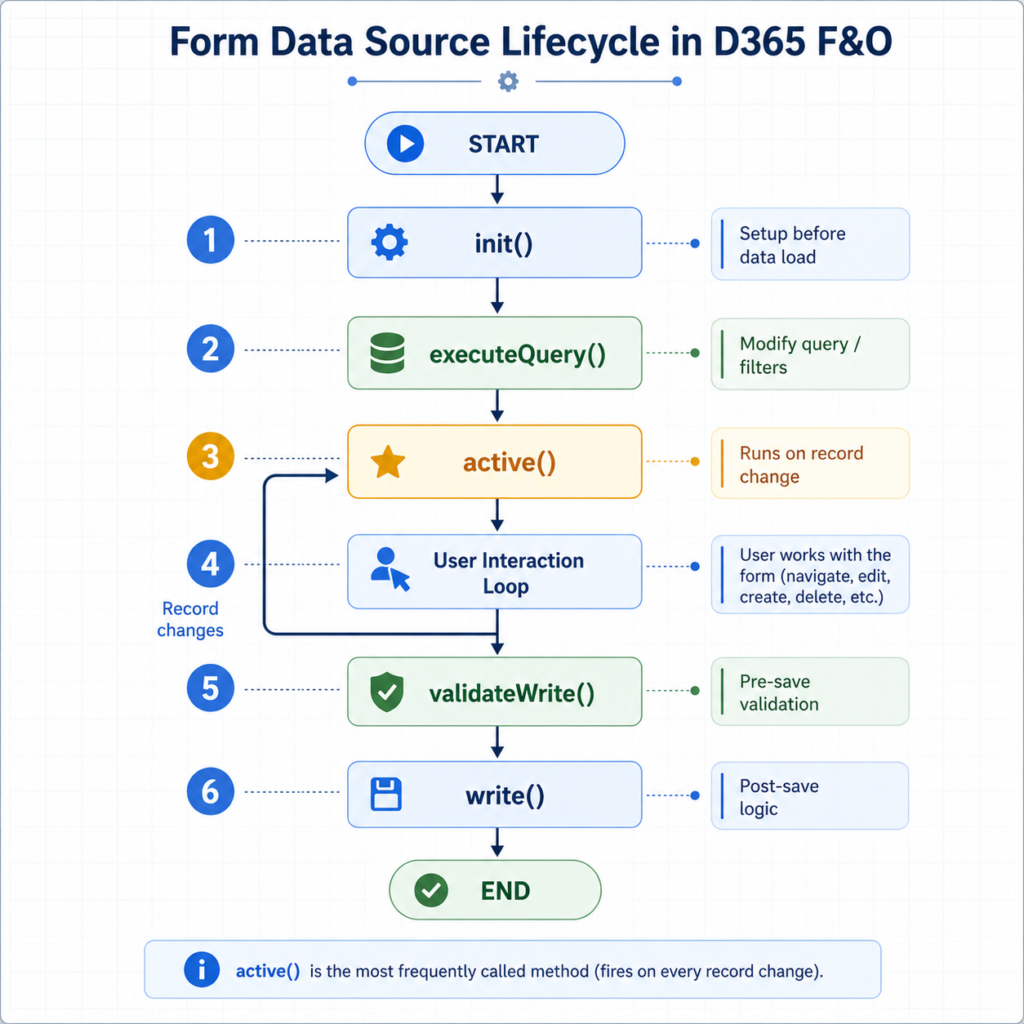
Form data source extensions — the methods that actually exist 

Data source methods correspond to the lifecycle of a record in a form’s grid or detail layout. The most commonly wrapped ones, with what each is actually good for: 

  • init() — fires once when the form initializes. Use for data-source-level setup that needs to happen before any record is fetched. 
  • active() — fires when the user navigates to a different record. This is the workhorse method for enabling/disabling controls based on the currently selected record’s state. 
  • executeQuery() — fires when the data source query runs. Use to inject filters or modify the query before records are fetched. 
  • validateWrite() — fires before a record is saved. Use to add custom save-time validation on top of the table-level rules. 
  • write() — fires when the record is saved. Use for post-save side effects that need to know the form context. 

A typical active() extension that enables or disables a control based on the current record. The pattern below is from Hafsa Fareed Siddiqui’s writeup on form data source extensions, which is the cleanest community example of the element. trick (more on that in a moment): 

[ExtensionOf(formDataSourceStr(SalesTable, SalesTable))] 
final class SalesTable_Ds_MyExt_Extension 
{ 
    public int active() 
    { 
        int ret = next active(); 

        SalesTable salesTable = this.cursor(); 

        if (salesTable.RecId) 
        { 
            element.control( 
                element.controlId(formControlStr(SalesTable, OfferNumber)) 
            ).enabled(salesTable.MyCustomFlag); 
        } 

        return ret; 
    } 

} 

The element. trick — what it is, when it works, when it doesn’t 

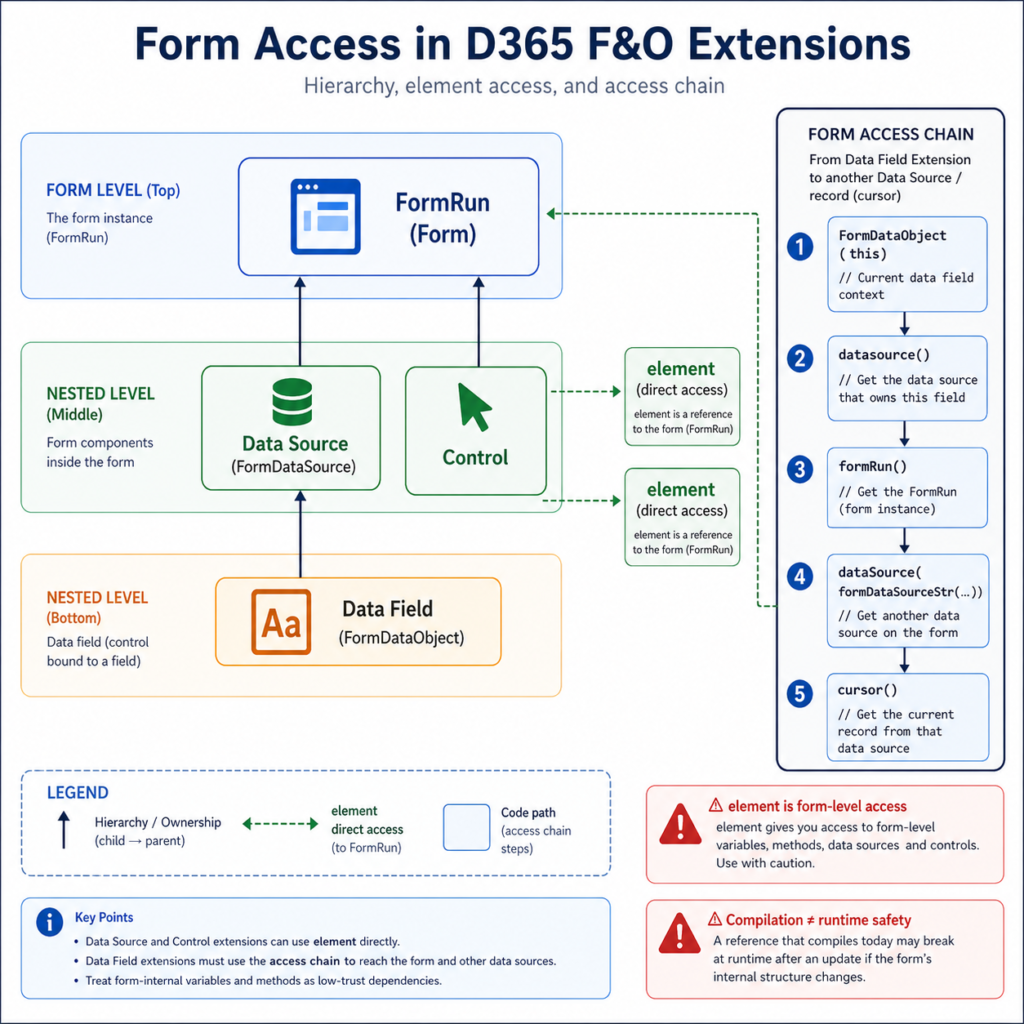
From inside a form-nested extension class, element is a reference to the form itself — the equivalent of this from inside the form’s own code. Microsoft’s method-wrapping page documents this directly: 

“//use element.FormToExtendVariable to access form’s variables and datasources / element.FormToExtendMethod() to call form methods” 

Powerful. Also a footgun. Three things to know: 

1. element resolves to the form-level scope, not the data source scope. If you write element.someMethod() inside a data source extension, you’re calling a form method, not a data source method. This is usually what you want — but be intentional. 

2. Compilation does not guarantee runtime existence. element.SomeVariable compiles if the form declares SomeVariable at the form level today. If a service update removes or renames it, your code still compiles against the new metadata only if the variable still exists with the same name. Microsoft does not guarantee form-internal variables are stable across versions. Treat element. access to form-internal state as a low-trust dependency, the same as you’d treat _args.getArg(“_someParam”) in a Pre/Post handler. 

3. From a data field extension, the path to the form is longer. Data field extensions don’t get element directly. The documented pattern (covered in d365ffo.com’s data source/control walkthroughs) is to cast this to a FormDataObject, get the data source, then get the form run from the data source. It’s verbose but it works. 

Form control extensions — and the OnClicked vs clicked() decision 

Control extensions wrap methods on a specific named control. The two flavours of extension here cause genuine confusion: 

CoC on the control method itself — wrap clicked(), modified(), lookup(), or validate() using [ExtensionOf(formControlStr(…))]. You’re overriding the X++ method that exists on the control. 

Event handlers on framework events — [FormControlEventHandler] subscribing to events like OnClicked, OnModified, OnValidating. You’re reacting to a framework event, not overriding a method. 

On most controls, both options exist for the same logical thing. So which one? 

Use CoC when you need to influence the control’s own behaviour — change the return value of validate(), suppress or alter what clicked() does, modify what lookup() shows. Use event handlers when you only need to react — log something, push a notification, refresh another control. Microsoft Learn’s CoC reference shows both, in the same page, as legitimate choices for the same ostensible task. The decision is functionally identical to the class-method CoC vs Pre/Post decision from Day 2: CoC for influence, handlers for reaction. 

The gotchas that bite in production 

Five form-extension surprises that appear on real projects. 

1. Static methods can’t be wrapped on form classes. Microsoft Learn states this explicitly: “The ability to wrap static methods doesn’t apply to forms. In X++, a form class isn’t a new class, and you can’t instantiate or reference it as a normal class.” If you’ve read this for the first time, that’s why your form CoC compiled but didn’t fire. 

2. You can’t add CoC to a method that doesn’t exist on the base. Same Microsoft page: “You can’t add CoC to wrap methods that aren’t defined in the original base behavior of the nested control type.” You cannot wrap a method on an extension. You cannot invent a new method on a control via CoC. The wrap targets must exist on the base. 

3. Form-nested CoC needs separate classes per nested concept. From Day 1, but worth restating because it’s the most common compile-time-passes-runtime-fails scenario in form work. A data source extension and a control extension on the same form must be in two distinct classes with two distinct [ExtensionOf] attributes. 

4. Visual Studio doesn’t surface wrappable methods. Microsoft’s own warning: “Currently, the X++ editor in Microsoft Visual Studio doesn’t support discovery of methods that you can wrap. Therefore, you must refer to the system documentation for each nested concept to identify the correct method to wrap and its exact signature.” ⚠ This is a real productivity tax. Keep the Microsoft Learn method-wrapping page open in a browser tab while you’re writing form extensions. 

5. Default parameter values must come from the base method. If you redeclare a default value in your extension method signature, the compiler rejects it. The default lives on the base; your extension just declares the parameter without one. 

3 tricky interview questions (with verified answers) 

Each answer traces to a named source linked in the references. 

Q1. You need a control to be enabled or disabled based on the currently selected record. Which extension method do you wrap? 

The data source’s active() method. active() fires every time the user navigates to a different record in the data source’s grid or detail. Wrapping it lets you read this.cursor() for the current record and conditionally enable/disable form controls via element.control(…). Wrapping a control’s own method (like clicked()) wouldn’t help — those methods only fire when the user interacts with the control, not when the underlying record changes. ⚠ Note that active() also fires once at form initialization with the first record, so guard against null/empty cursors if your form can open with no records. 

Q2. Why doesn’t a CoC on a static method of a form class compile, even though the syntax looks correct? 

Because forms aren’t real classes from CoC’s perspective. Microsoft Learn states the rule directly: “The ability to wrap static methods doesn’t apply to forms. In X++, a form class isn’t a new class, and you can’t instantiate or reference it as a normal class.” You can wrap instance-level methods on data sources, data fields, and controls — those are nested concepts the runtime treats as wrappable. Static methods declared at form level are not. The fix is either to refactor the static method into a regular class that you can extend, or to use an event handler if a suitable framework event exists. 

Q3. From inside a data field extension, how do you reach a different data source on the same form? 

Data field extensions don’t get element for free. The documented pattern (covered in d365ffo.com’s writeup on form-level access from extensions) is to cast this to FormDataObject, retrieve the data source from there, get the FormRun from the data source, and then access the other data source through the FormRun. The chain looks like: FormDataObject → datasource() → formRun() → dataSource(formDataSourceStr(…)) → cursor(). Verbose, but it’s the supported route. Trying to access form-level state directly from a data field extension is the wrong shape — the field doesn’t have first-class access to the form. 

What to actually do 

  1. Pick one extension target per class. Form, data source, data field, control — never combine. The compiler will let you write something that looks combined; it won’t run the way you expect. 
  1. Default to data source active() for record-driven enable/disable logic. Default to control event handlers for pure react-to-click logic. Default to control CoC when you need to influence what the click does. 
  1. Treat element. access to form-internal variables as a low-trust dependency. It’s fine to use, but flag it in code review the same way you’d flag any reach into another package’s internals. 
  1. Keep the Microsoft Learn method-wrapping page open while writing. Visual Studio won’t tell you what’s wrappable; the docs will. 
  1. If a CoC compiles but doesn’t fire at runtime, check three things in order: is the method actually defined on the base (not on another extension)? Is the method static (in which case it can’t be wrapped on a form)? Are you sure the extension class is in a package that references the base form’s package? 

References 

  • Microsoft Learn — Class extension: Method wrapping and Chain of Command (learn.microsoft.com/en-us/dynamics365/fin-ops-core/dev-itpro/extensibility/method-wrapping-coc). Authoritative reference. The form-nested section explicitly covers form, data source, data field, and control extension patterns and the static-method-on-forms restriction. Last updated March 2026. 
  • Microsoft Learn — Add data sources to forms through extension (learn.microsoft.com/en-us/dynamics365/fin-ops-core/dev-itpro/extensibility/add-datasource). Companion reference for adding new data sources via extension, separate from the method-wrapping concern. Last updated March 2026. 
  • Hafsa Fareed Siddiqui — Get records on Form DataSource X++ D365FO (Medium, March 2024). Source for the active() pattern using element.control(…) shown above. Clean, current example. 
  • d365ffo.com — AX / D365FO – Get datasource from a Form extension class. Source for the FormDataObject → formRun() chain referenced in Q3. Covers form data source, control, and data field extension access patterns. 
  • Dynamics 365 Musings — Chain Of Command For Form DataSource (dynamics365musings.com/chain-of-command-for-form-datasource/). Practical CoC patterns for form data sources with current syntax. Updated 2024. 

Next up in this series: Table Extensions vs CoC on Tables — Picking the Right Tool for Adding Fields and Logic .

April 29, 2026 0 comments
0 FacebookTwitterPinterestLinkedinWhatsappEmail
D365 F&O

The 5 X++ Extension Pitfalls I See on Almost Every D365 F&O Project 

by Muhammad Salman Siddiqui April 27, 2026

Reading time: ~7 minutes. 

Days 1 and 2 on this blog laid out the mechanics of Chain of Command and event handlers. This post is about what goes wrong anyway. Every one of the pitfalls below is something you can point at in working, compiling, passing-UAT code — and every one of them is where production pain eventually surfaces. None of them involve AX 2012 or anything older than the current 10.0.46 GA line. All are sourced. 

If you haven’t read the earlier posts: the CoC guide is here: Chain of Command in D365 F&O, and the event handler decision framework is here: Event Handlers vs Chain of Command. 

1. Extensions that silently assume call order 

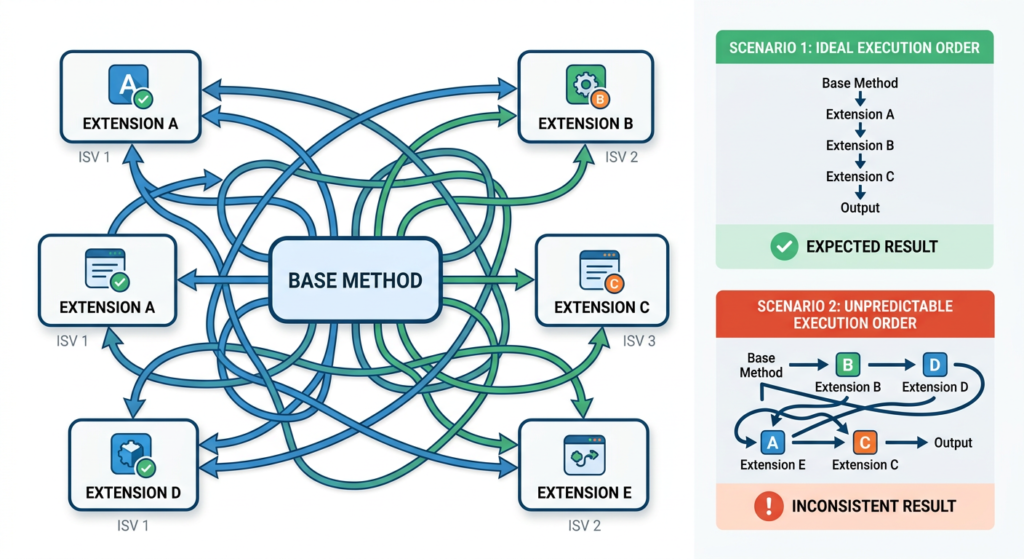
The single most common extensibility bug on multi-ISV tenants — and the one hardest to reproduce locally. Microsoft’s documentation is explicit on two fronts: CoC extensions run in random order, and subscribers to the same publisher have “no way of specifying the sequence in which subscribers are called”. Both statements are on Microsoft Learn today. 

The failure mode is almost always the same: a developer writes an extension that assumes state set by an earlier extension will be available, or that it will run “before” or “after” a known competitor’s extension. It works in their sandbox because no other extensions are present. It fails intermittently in a tenant with multiple ISVs, because the runtime picks a different order on different invocations. 

Fix: design every extension to be order-independent. If your logic genuinely depends on ordering — a rare legitimate case — move it to a published delegate where the event is explicitly raised at a known point in the base flow, or restructure the design so both behaviours run from the same extension. Never ship code that works “usually.” 

2. Trusting XppPrePostArgs.getArg() as if it were compile-safe 

Pre and Post handlers pull their arguments from an XppPrePostArgs collection, keyed by string: 

FieldId fieldId = _args.getArg("_fieldId"); 

That string is not validated at compile time. If Microsoft renames the parameter in a future service update — or if the method signature changes in any way — your code still compiles, still deploys, and silently fails at runtime. You either get a null value or the wrong argument, and because everything looks fine in a build log, the regression only surfaces when something downstream breaks. 

Microsoft itself warns about this on the Events and delegates reference page: “Pre and Post handlers can easily break as the result of added or removed parameters, changed parameter types, or because methods are no longer called, or called under different circumstances.” That’s the authoritative source telling you, in their own documentation, that this pattern is fragile. 

Fix: prefer CoC for method-level overrides when feasible. CoC signatures are validated at compile time — a renamed parameter breaks your build instead of your production. When you must use a Pre/Post handler (because CoC isn’t available), at minimum add a code comment naming the argument keys you depend on, so the next consultant maintaining the code knows what to check against the current base method. 

3. Wrapping hot-path methods without measuring 

CoC’s overhead per call is small. That’s almost always irrelevant — and occasionally catastrophic. The distinction is the call frequency. A CoC extension on SalesTable.validateWrite() fires on every save: maybe a few thousand times a day. Fine. A CoC extension on a method inside a settlement loop, a posting flow, or an inventory-close calculation can fire tens or hundreds of thousands of times in a single batch run. Not fine. 

Jayaprakash C’s 2025 writeup on optimizing Ledger Journal posting in D365 F&O (Medium, linked below) is a current example of this class of problem: a posting flow that was consuming over 40% of the transaction log footprint due to sequential, unoptimized extension patterns. The fix wasn’t removing customization — it was restructuring around Microsoft’s own multi-post and parallel-posting utilities. The lesson generalizes: extensions in posting paths need to be treated as performance-sensitive code. 

Fix: before wrapping anything in an inventory, settlement, or posting flow, instrument it. Application Insights integration with F&O is a native, first-class capability — Alex Meyer’s telemetry FAQs document that a custom telemetry event costs about 1 millisecond to emit because the architecture is asynchronous. That’s cheap enough to sprinkle liberally during load testing. Measure before you ship, not after the client opens a ticket about month-end taking three hours longer than it used to. ⚠ Telemetry setup itself requires enabling the Monitoring and Telemetry feature in Feature Management and connecting an Azure Application Insights resource; verify it’s enabled in your tenant before relying on it. 

4. Carrying forward mental models that used to be true 

Extensibility in modern F&O has a different ruleset than it did in earlier generations of the product. Several techniques that were standard practice — overlayering Microsoft source, adding [Hookable(true)] to a protected method so you could subscribe to it, direct source modification — are either unsupported now or are actively the wrong approach. 

The most common manifestation: a consultant adds an overlayer workaround to expose a protected method, and the code works. It builds, it deploys, it runs. The problems are invisible until a service update breaks the assumption, or until someone tries to apply the package on a tenant where overlayering isn’t permitted. The correct answer today is almost always one of: use CoC (which accesses protected members natively — documented on the method-wrapping page), find a Microsoft-published delegate, or refactor to depend only on public surface. 

Fix: when you see a workaround in existing code that relies on overlayering or Hookable toggles, flag it for replacement. Don’t replicate the pattern in new code, even if the old code still compiles. Every instance is a future-brittleness bet you don’t need to make. 

5. Breaking the next call contract in CoC — and not realizing it 

The next call in a CoC extension isn’t optional decoration — it is the contract that keeps the chain of wrappers working. Microsoft’s method-wrapping documentation is explicit: calls to next cannot be made conditionally inside an if, cannot appear inside loops (while, do-while, for), cannot be preceded by a return, and cannot appear inside logical expressions (because of short-circuit optimization). 

The failure here is more subtle than pitfall #1. The compiler enforces the structural rule — you physically can’t put next inside a for loop. What developers do instead is skip the next call entirely, or wrap logic in a way that conditionally bypasses the rest of the chain. Both break other extensions in the same chain. Both build. Both pass basic testing. Both fail when a second ISV’s extension stops firing on the same method and the vendor can’t reproduce it. 

Fix: call next unconditionally, at the top level of the method body, exactly as Microsoft specifies. The only legitimate exceptions are methods marked [Replaceable] (where skipping next is a supported design decision) and — since the structural rule was loosened — wrapping the call in try/catch/finally. Everything else fights the framework, and the framework wins. 

3 tricky interview questions (with verified answers) 

Same format as earlier posts. Each answer traces to a named, linked source. 

Q1. Your extension passes all tests in UAT but breaks only in production. What are the three most likely causes? 

Strong answers cover three independent axes. First, order-dependence — UAT may only have your extension on the method, while production has multiple ISVs wrapping the same method, and the non-deterministic call order surfaces in the larger environment. Second, data volume — UAT typically runs on a small dataset, and extensions on posting/settlement/close paths only reveal performance problems at production scale (the Ledger Journal optimization case referenced above is a textbook example). Third, environment configuration drift — telemetry enabled or disabled, feature flags on in one tenant and off in the other, different platform service-update levels between UAT and production. A candidate who names only one of these has a narrower mental model than the role demands. 

Q2. Given a Post handler that reads an argument via _args.getArg(“_custAccount”), what could make this silently return a wrong value after a service update? 

The argument key is a string, not a compile-time reference, so three things can break it silently: a rename of the parameter in the base method (“_custAccount” → “_accountNum”, for example), a change in parameter type that still resolves to a compatible X++ type at call time, or the base method being replaced by a wrapper that no longer calls the original with the same arg shape. The Microsoft Learn Events and delegates page explicitly lists these failure modes. The mitigation — and this is the answer an interviewer is listening for — is to prefer CoC when overriding method-level logic, because the signature is bound at compile time. The _args.getArg pattern is the right one only when CoC isn’t an option. 

Q3. Before wrapping a standard F&O method with CoC, what three attributes should you check on the base method? 

Three, all documented on Microsoft Learn’s class extension reference page: [Hookable(false)] — the method is completely sealed; neither CoC nor Pre/Post handlers will bind. [Wrappable(false)] — CoC is blocked specifically, though Pre/Post handlers may still work. [Replaceable] — CoC is permitted and the compiler will not force you to call next, meaning you can legitimately override the base entirely. Also worth noting in an interview: [Hookable(true)] applies only to pre/post handlers and does not enable CoC wrapping — a common trap. A candidate who confuses these four attributes usually hasn’t read the method-wrapping page recently. 

What to actually do 

  1. Review every extension in your solution for implicit ordering assumptions. If an extension reads state set elsewhere, it’s a candidate for failure. 
  1. Grep your codebase for _args.getArg calls. Each one is a string-based coupling to a base method. For each, ask: could this be refactored to CoC? If yes, refactor it. 
  1. Before adding CoC on any method in a posting, settlement, or batch flow, enable Application Insights in a test environment and instrument the method to measure baseline call frequency and duration. 
  1. When you encounter overlayering or Hookable-toggle workarounds in existing code, don’t replicate the pattern in new work. Note them for replacement. 
  1. In code reviews, verify that every CoC extension calls next unconditionally at the top level — unless the method is explicitly [Replaceable] and the decision to skip next is documented in a comment. 

References 

  • Microsoft Learn — Class extension: Method wrapping and Chain of Command (learn.microsoft.com/en-us/dynamics365/fin-ops-core/dev-itpro/extensibility/method-wrapping-coc). Authoritative reference for CoC rules, the next-call contract, and the Hookable/Wrappable/Replaceable attribute semantics in pitfalls 4 and 5. 
  • Microsoft Learn — Events and delegates (learn.microsoft.com/en-us/dynamics365/fin-ops-core/dev-itpro/dev-ref/xpp-events). Source for pitfall 2 and Q2 — specifically Microsoft’s own warning that Pre/Post handlers “can easily break as the result of added or removed parameters.” Last updated February 2025. 
  • Jayaprakash C — Optimizing Ledger Journal Posting in D365 F&O (medium.com/@jayaprakashc079, March 2025). Current case study showing how posting-flow extensions can become performance bottlenecks at production scale, and how to restructure using standard multi-post utilities. Source for pitfall 3. 
  • Alex Meyer — D365FO Telemetry Data FAQs (alexdmeyer.com/2025/03/19/d365fo-telemetry-data-faqs/). Authoritative community source on the native Application Insights integration, the asynchronous telemetry architecture, and the ~1ms cost of emitting a custom telemetry event. Source for the pitfall 3 mitigation approach. 
  • Prodware — Monitoring and Telemetry in D365 F&O with Application Insights (blog.prodwaregroup.com, August 2025). Step-by-step for enabling the Monitoring and Telemetry feature and connecting an Application Insights instance. Supporting reference for pitfall 3. 

Next up in this series: Form Extensions in D365 F&O — Data Sources, Controls, and the Gotchas Nobody Warns You About . Back to a tactical deep-dive. 

April 27, 2026 0 comments
0 FacebookTwitterPinterestLinkedinWhatsappEmail
D365-F&O
D365 F&O

Designing a Scalable Multi-Source Order Processing Cycle in Dynamics 365 Finance & Operations

by Muhammad Salman Siddiqui February 16, 2026

Introduction 

Modern enterprises rarely operate with a single order intake channel. Orders can originate from web stores, partner systems, EDI networks, or even file-based submissions such as Excel. The real challenge for organizations is not just capturing these orders, but orchestrating a controlled, automated, and financially compliant end-to-end order lifecycle. 

Microsoft Dynamics 365 Finance & Operations (D365FO) provides a strong foundation to act as a central orchestration engine for such scenarios. When designed correctly, it can seamlessly integrate multiple order sources, validate inventory and financial constraints, automate warehouse execution, and ensure accurate invoicing with minimal manual intervention. 

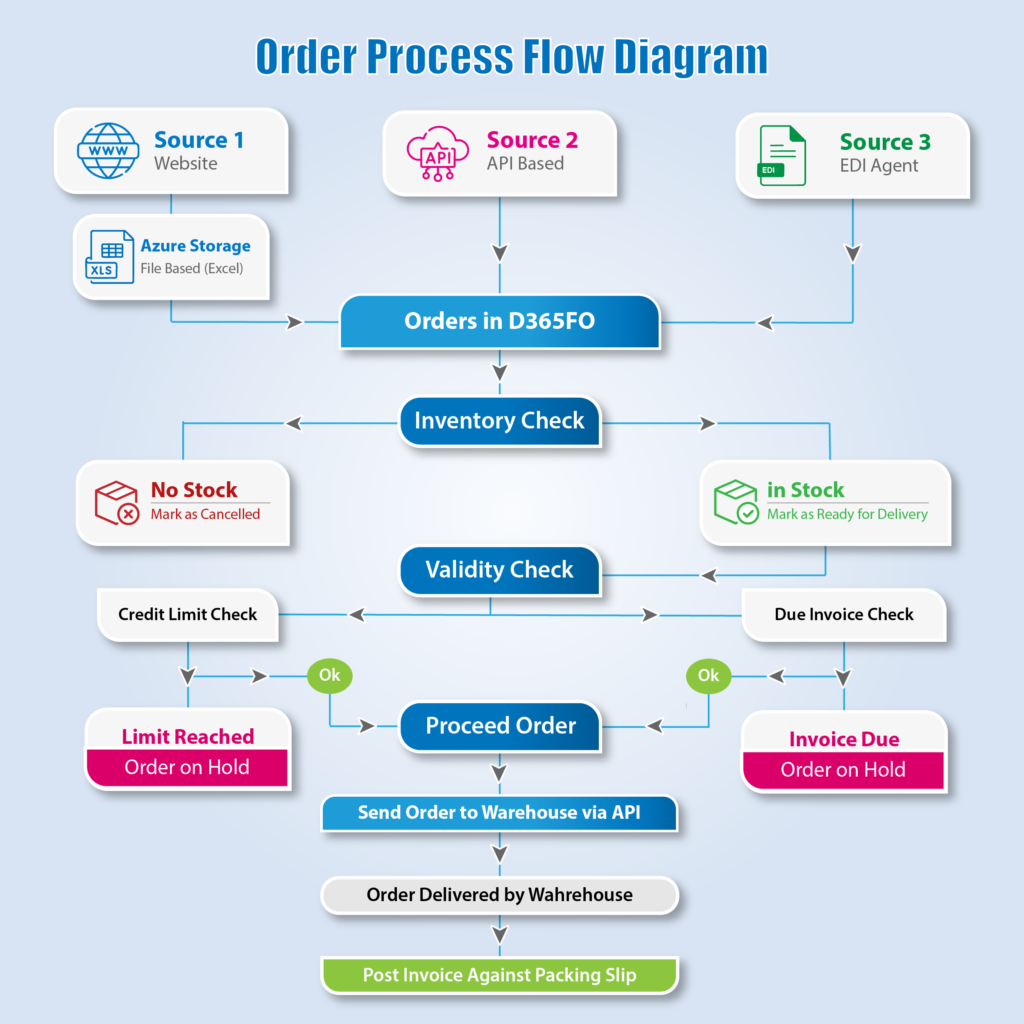
This blog presents a generic, reusable, and Microsoft-aligned technical architecture for implementing an end-to-end Order-to-Cash (O2C) process in D365FO. 

Business Requirement Overview 

Organizations typically require an ERP-driven solution that can: 

  • Accept orders from multiple external sources 
  • Identify and track the origin of each order 
  • Validate inventory availability at order intake 
  • Enforce customer credit limits and overdue invoice rules 
  • Prevent invalid orders from reaching the warehouse 
  • Integrate with external warehouse systems 
  • Automatically confirm delivery and post invoices 

The objective is to achieve automation, scalability, auditability, and financial governance without over-customizing the core ERP system. 

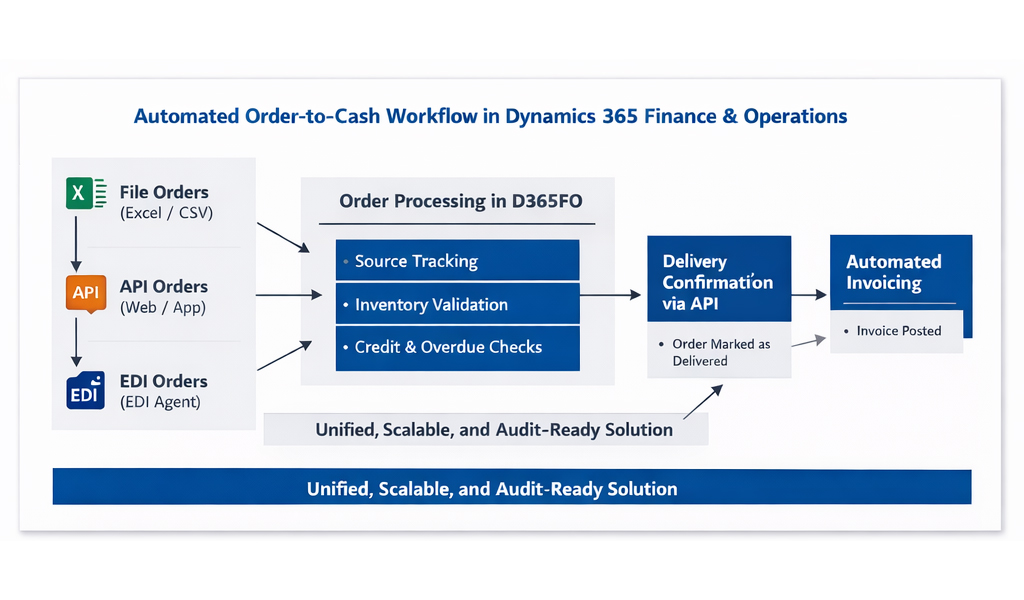
Multi-Source Order Ingestion Architecture 

[Multi-source order ingestion architecture diagram showing File, API, and EDI sources feeding into D365FO] 

To support modern commerce models, D365FO must handle multiple inbound integration patterns while maintaining a unified processing flow. 

Source 1: File-Based Orders (Excel / CSV) 

File-based integration is common where upstream systems or partners cannot integrate in real time. Orders are received in structured formats such as Excel or CSV and processed through a controlled import mechanism. 

Key characteristics:

  • Batch-driven ingestion 
  • Schema and data validation 
  • Duplicate order prevention 
  • Error handling and logging 

This approach is ideal for scheduled or low-frequency order submissions. 

Source 2: API-Based Orders 

API-based integration enables real-time order creation directly in D365FO. This pattern is commonly used for e-commerce platforms, mobile applications, and internal systems. 

Key characteristics: 

  • Near real-time processing 
  • Immediate validation 
  • High scalability 
  • Suitable for high-volume digital channels 

Source 3: EDI-Based Orders via Integration Agents 

In B2B environments, orders are often exchanged using EDI standards. An EDI agent receives partner messages, transforms them into a canonical format, and submits them to D365FO via APIs. 

Benefits include: 

  • Standardized partner communication 
  • High reliability 
  • Reduced manual intervention 
  • Proven scalability in supply chain ecosystems 

Unified Order Creation and Source Tracking 

[Sales order creation flow with order source tagging]

Regardless of the inbound channel, all orders follow a single standardized order creation process in D365FO. 

Each order is tagged with an Order Source indicator, enabling: 

  • Source-based reporting and analytics 
  • Operational visibility 
  • Downstream process control 
  • Easier troubleshooting and audits 

This design follows Microsoft best practices by using extensions rather than modifying standard D365FO logic.

Inventory Validation at Order Logging 

[Inventory availability check during sales order creation] 

Inventory availability is validated at the time of order creation. 

  • If inventory is available, the order proceeds 
  • If inventory is not available, the affected line or order is marked as cancelled 

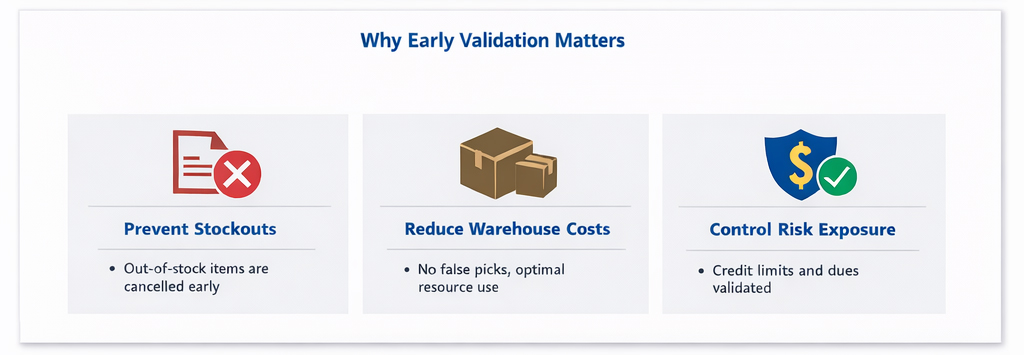
By handling inventory exceptions early: 

  • Invalid orders never reach the warehouse 
  • Picking and packing inefficiencies are eliminated 
  • Customer expectations are managed proactively 

Order Lifecycle and Status Management 

[Order lifecycle states from Created to Invoiced] 

A controlled order lifecycle ensures transparency and governance throughout the process. A typical lifecycle includes: 

  • Created 
  • Ready for Delivery 
  • On Hold (Financial / Credit) 
  • Sent to Warehouse 
  • Delivered 
  • Invoiced 

Status transitions are system-driven and fully auditable. 

Financial and Credit Control Validations 

Credit Limit Validation 

Before an order is released to the warehouse, the system validates the customer’s credit limit. 

  • If the credit limit is exceeded, the order is placed on hold 
  • Once payment is received, the order can be automatically released 

This prevents financial overexposure while maintaining operational flow. 

Overdue Invoice Validation 

The system also checks for overdue customer invoices. 

  • If overdue invoices exist, the order is stopped 
  • Further processing resumes only after financial obligations are cleared 

This validation ensures strong financial discipline and compliance. 

Warehouse Integration via API 

[ERP to Warehouse API integration flow]

A scheduled batch process in D365FO identifies orders that:

  • Have valid inventory 
  • Are financially approved 
  • Are not on hold 

Eligible orders are sent to the warehouse system via API for: 

  • Picking 
  • Packing 
  • Delivery execution 

This decoupled integration approach allows independent scaling of ERP and warehouse systems. 

Delivery Confirmation and System Feedback 

[Warehouse delivery confirmation sent back to D365FO]

Once delivery is completed: 

  • The warehouse system sends a confirmation to D365FO via API 
  • The sales order is marked as Delivered 
  • Packing slips are confirmed automatically 

This real-time feedback loop ensures accurate order status visibility. 

Automated Invoicing 

[Automated invoicing batch process in D365FO]

A standard D365FO batch job posts invoices against confirmed packing slips. 

Key outcomes: 

  • Orders move to Invoiced status 
  • Revenue is recognized correctly 
  • Manual invoicing effort is eliminated 

This step leverages standard D365FO capabilities combined with robust orchestration. 

Key Benefits of the Architecture 

  • End-to-end automated Order-to-Cash process 
  • Multi-channel order intake 
  • Early inventory and financial validation 
  • Warehouse-safe execution 
  • Reduced manual intervention 
  • High scalability and extensibility 
  • Full audit and compliance support 

Conclusion 

This architecture demonstrates how Dynamics 365 Finance & Operations can act as a central orchestration platform for complex order processing landscapes. By combining multiple integration patterns, early validations, warehouse automation, and standard financial controls, organizations can build a resilient and scalable order fulfillment process. 

The approach is generic, reusable across industries, and fully aligned with Microsoft-recommended best practices—making it suitable for enterprises looking to modernize and scale their Order-to-Cash operations. 

Operational Monitoring and Exception Handling 

In any automated order processing architecture, operational visibility is critical. While the process is largely system-driven, exceptions must be detected and handled proactively. 

Key monitoring aspects include: 

  • Failed order imports (file, API, or EDI) 
  • Inventory shortages beyond acceptable thresholds 
  • Orders placed on financial or credit hold 
  • Warehouse integration failures 
  • Delivery confirmation delays 

D365FO batch job history, infologs, and integration logs play a vital role in identifying issues early. Alerts and dashboards can be configured to notify operational teams when manual intervention is required, ensuring continuity without breaking automation. 

Error Handling and Reprocessing Strategy 

A robust error-handling strategy ensures system resilience. 

Best practices include: 

  • Storing failed inbound messages with detailed error context 
  • Allowing safe reprocessing without duplicate order creation 
  • Separating technical errors from business validation failures 
  • Maintaining idempotency for API-based integrations 

This approach minimizes downtime and avoids data inconsistencies across integrated systems. 

Security and Compliance Considerations 

Security is a core design principle in multi-system integrations. 

Important considerations: 

  • API authentication and authorization 
  • Role-based access control within D365FO 
  • Secure handling of customer and financial data 
  • Audit trails for order status changes and financial postings 

By leveraging D365FO security frameworks and secure integration patterns, organizations can meet internal and regulatory compliance requirements. 

Scalability and Performance Design 

As order volumes grow, the architecture must scale without compromising performance. 

February 16, 2026 0 comments
0 FacebookTwitterPinterestLinkedinWhatsappEmail

Recent Posts

  • Delegates in X++: The Underused Pattern for Clean Extensibility 
  • Table Extensions vs CoC on Tables: Picking the Right Tool for Adding Fields and Logic 
  • Form Extensions in D365 F&O: Data Sources, Controls, and the Gotchas Nobody Warns You About 
  • The 5 X++ Extension Pitfalls I See on Almost Every D365 F&O Project 
  • Event Handlers vs Chain of Command: The Real Decision Framework for 2026

Recent Comments

No comments to show.

About Me

About Me

Writer & Reader

Muhammad Salman Siddiqui

Technical Delivery Lead for Dynamics 365 Finance & Operations | Solution Architect

A consistent, meritorious and motivated professional looking forward to a challenging career in an environment that brings the best out of people while developing them personally and professionally.

read more

Keep in touch

Linkedin Email

Recent Posts

  • Delegates in X++: The Underused Pattern for Clean Extensibility 

    April 30, 2026
  • Table Extensions vs CoC on Tables: Picking the Right Tool for Adding Fields and Logic 

    April 30, 2026
  • Form Extensions in D365 F&O: Data Sources, Controls, and the Gotchas Nobody Warns You About 

    April 29, 2026
  • The 5 X++ Extension Pitfalls I See on Almost Every D365 F&O Project 

    April 27, 2026
  • Event Handlers vs Chain of Command: The Real Decision Framework for 2026

    April 27, 2026

Categories

  • D365 F&O (5)
  • Uncategorized (2)

About me

banner

Muhammad Salman Siddiqui

Technical Delivery Lead for Dynamics 365 Finance & Operations | Solution Architect

A consistent, meritorious and motivated professional looking forward to a challenging career in an environment that brings the best out of people while developing them personally and professionally.

read more

Popular Posts

  • 1

    Designing a Scalable Multi-Source Order Processing Cycle in Dynamics 365 Finance & Operations

    February 16, 2026
  • Chain of Command in D365 F&O: A Practitioner’s Guide to When (and When Not) to Use It

    April 26, 2026
  • Event Handlers vs Chain of Command: The Real Decision Framework for 2026

    April 27, 2026
  • Linkedin

@2026 - All Right Reserved. Designed and Developed by CLOUDCLIF


Back To Top
CLOUDCLIF – Blogs
  • Home
  • D365 F&O
  • Work Flows
  • Reports
  • Enterprise Portal