
Reading time: ~9 minutes.
Form extensions are where most F&O developers stop reading the Microsoft Learn docs too early. The syntax looks straightforward — slap [ExtensionOf] on a class, name your extension method the same as the base, call next, done. Then you spend an afternoon wondering why your data source extension compiles but never fires, or why your control extension can wrap clicked() but not lookup(), or why element. resolves at compile time but blows up at runtime. This post is the part of the docs they don’t make you read.
If you haven’t read the earlier posts on the underlying CoC mechanics: Chain of Command in D365 F&O. The decision framework on CoC vs event handlers is here: Event Handlers vs Chain of Command.
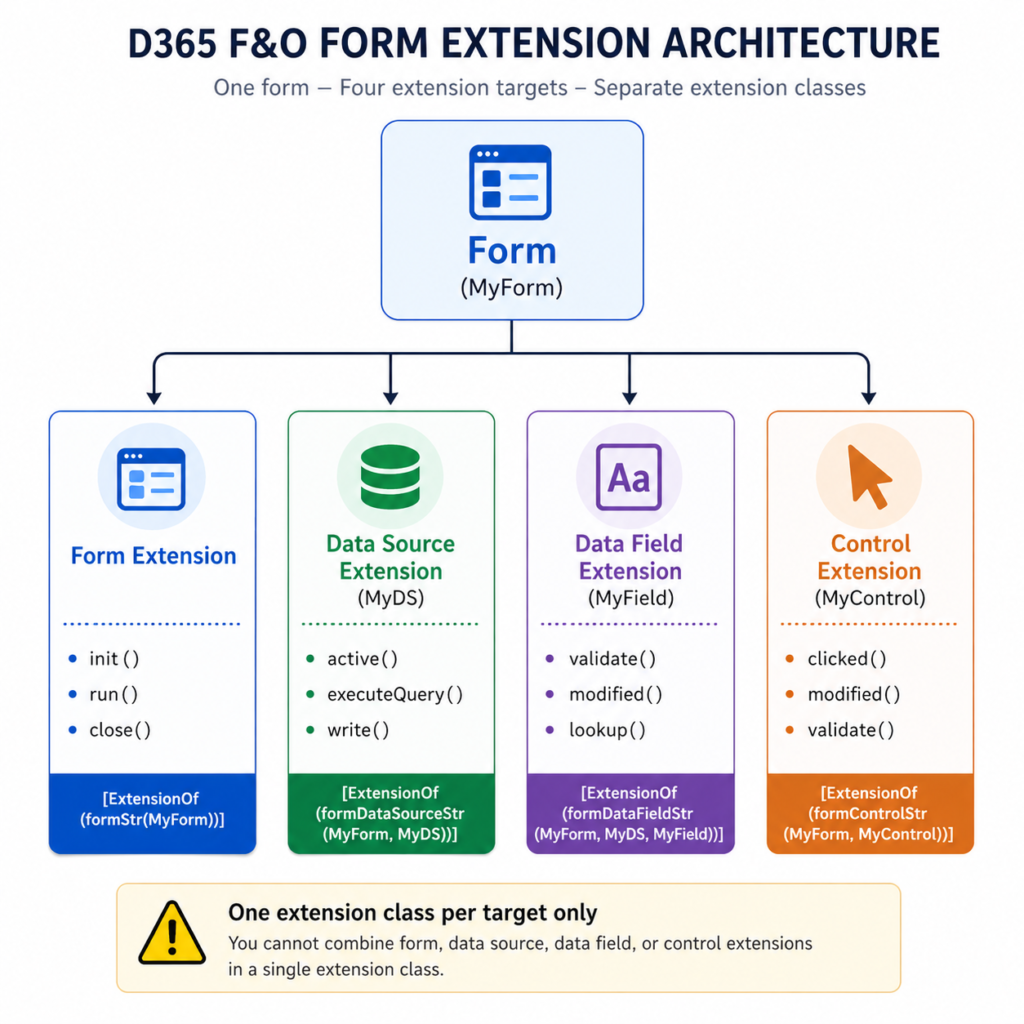
Three extension targets, three separate extension classes
First rule, easy to violate: a single extension class can target exactly one form artifact. Form, data source, data field, or control — each one is its own [ExtensionOf]. You cannot combine them. Trying to wrap a form-level method and a data source method in the same class either fails to compile or — worse — silently ignores the wrong one.
The four extension target shapes you’ll write:
- [ExtensionOf(formStr(MyForm))] — wraps form-level methods like init, run, close.
- [ExtensionOf(formDataSourceStr(MyForm, MyDS))] — wraps data source methods like init, active, executeQuery, validateWrite, write.
- [ExtensionOf(formDataFieldStr(MyForm, MyDS, MyField))] — wraps the methods on a specific data field, primarily validate, modified, lookup.
- [ExtensionOf(formControlStr(MyForm, MyControl))] — wraps control methods like clicked, modified, validate.
Microsoft’s method-wrapping reference shows the pattern explicitly. Worth quoting because the next bit catches people:
Microsoft’s method-wrapping reference shows the pattern explicitly. Worth quoting because the next bit catches people:
“Like other CoC methods, these methods must always call next to invoke the next method in the chain, so that the chain can go all the way to the kernel or native implementation in the runtime behavior. The call to next is equivalent to a call to super() from the form itself to help guarantee that the base behavior in the runtime always runs as expected.”
Translation: the next call inside a form-nested CoC isn’t optional. Skipping it on a data source init won’t just break your extension — it can break the form’s data binding entirely. The same rules from class-level CoC apply. The framework just gives you more places to forget them.
Form data source extensions — the methods that actually exist
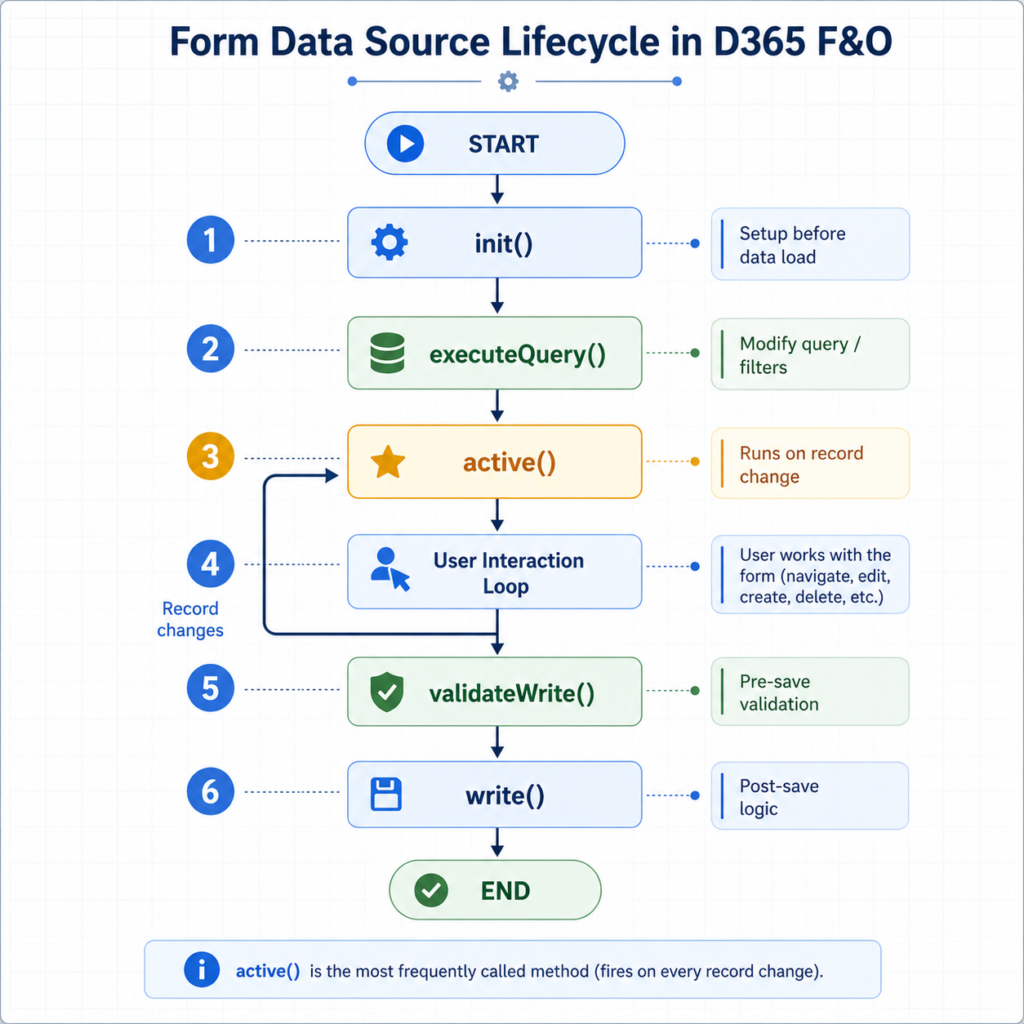
Data source methods correspond to the lifecycle of a record in a form’s grid or detail layout. The most commonly wrapped ones, with what each is actually good for:
- init() — fires once when the form initializes. Use for data-source-level setup that needs to happen before any record is fetched.
- active() — fires when the user navigates to a different record. This is the workhorse method for enabling/disabling controls based on the currently selected record’s state.
- executeQuery() — fires when the data source query runs. Use to inject filters or modify the query before records are fetched.
- validateWrite() — fires before a record is saved. Use to add custom save-time validation on top of the table-level rules.
- write() — fires when the record is saved. Use for post-save side effects that need to know the form context.
A typical active() extension that enables or disables a control based on the current record. The pattern below is from Hafsa Fareed Siddiqui’s writeup on form data source extensions, which is the cleanest community example of the element. trick (more on that in a moment):
[ExtensionOf(formDataSourceStr(SalesTable, SalesTable))]
final class SalesTable_Ds_MyExt_Extension
{
    public int active()
    {
        int ret = next active();

        SalesTable salesTable = this.cursor();

        if (salesTable.RecId)
        {
            element.control(
                element.controlId(formControlStr(SalesTable, OfferNumber))
            ).enabled(salesTable.MyCustomFlag);
        }

        return ret;
    }

}
The element. trick — what it is, when it works, when it doesn’t
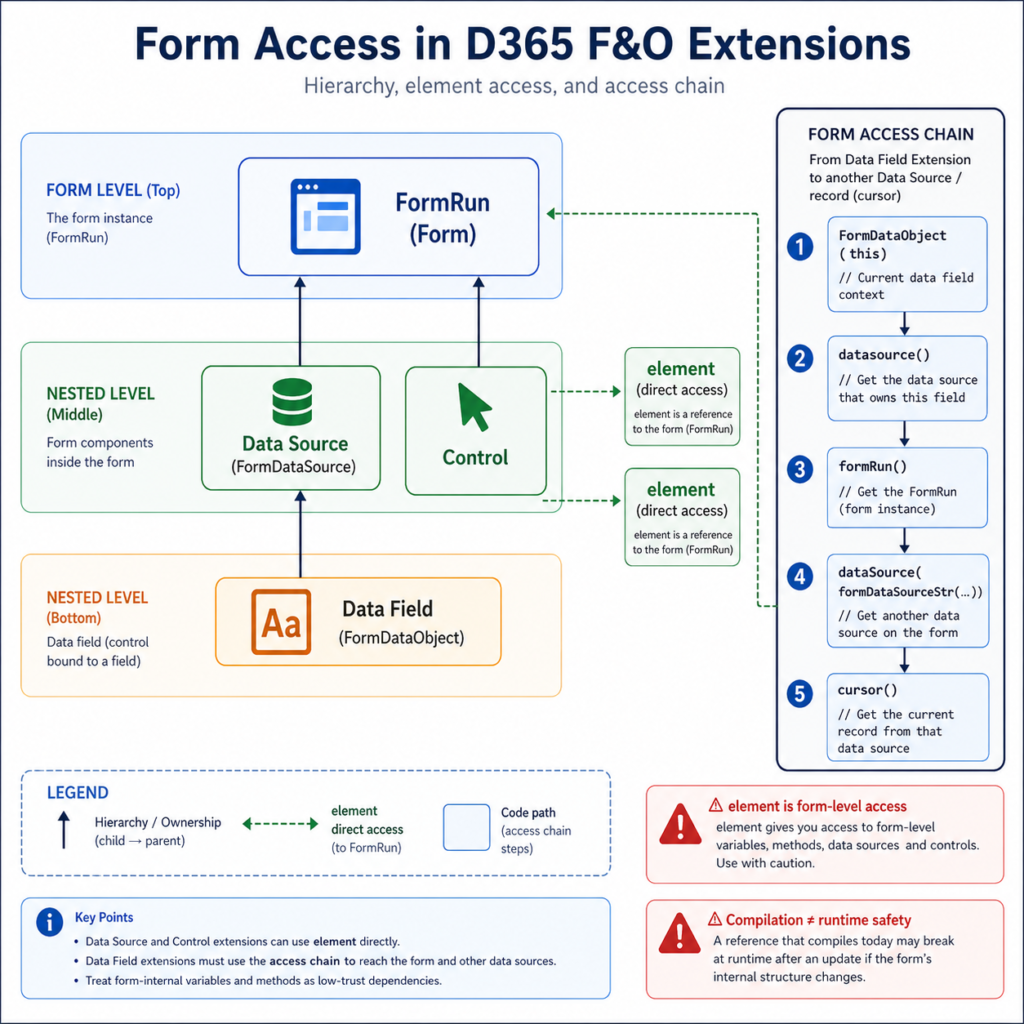
From inside a form-nested extension class, element is a reference to the form itself — the equivalent of this from inside the form’s own code. Microsoft’s method-wrapping page documents this directly:
“//use element.FormToExtendVariable to access form’s variables and datasources / element.FormToExtendMethod() to call form methods”
Powerful. Also a footgun. Three things to know:
1. element resolves to the form-level scope, not the data source scope. If you write element.someMethod() inside a data source extension, you’re calling a form method, not a data source method. This is usually what you want — but be intentional.
2. Compilation does not guarantee runtime existence. element.SomeVariable compiles if the form declares SomeVariable at the form level today. If a service update removes or renames it, your code still compiles against the new metadata only if the variable still exists with the same name. Microsoft does not guarantee form-internal variables are stable across versions. Treat element. access to form-internal state as a low-trust dependency, the same as you’d treat _args.getArg(“_someParam”) in a Pre/Post handler.
3. From a data field extension, the path to the form is longer. Data field extensions don’t get element directly. The documented pattern (covered in d365ffo.com’s data source/control walkthroughs) is to cast this to a FormDataObject, get the data source, then get the form run from the data source. It’s verbose but it works.
Form control extensions — and the OnClicked vs clicked() decision
Control extensions wrap methods on a specific named control. The two flavours of extension here cause genuine confusion:
CoC on the control method itself — wrap clicked(), modified(), lookup(), or validate() using [ExtensionOf(formControlStr(…))]. You’re overriding the X++ method that exists on the control.
Event handlers on framework events — [FormControlEventHandler] subscribing to events like OnClicked, OnModified, OnValidating. You’re reacting to a framework event, not overriding a method.
On most controls, both options exist for the same logical thing. So which one?
Use CoC when you need to influence the control’s own behaviour — change the return value of validate(), suppress or alter what clicked() does, modify what lookup() shows. Use event handlers when you only need to react — log something, push a notification, refresh another control. Microsoft Learn’s CoC reference shows both, in the same page, as legitimate choices for the same ostensible task. The decision is functionally identical to the class-method CoC vs Pre/Post decision from Day 2: CoC for influence, handlers for reaction.
The gotchas that bite in production
Five form-extension surprises that appear on real projects.
1. Static methods can’t be wrapped on form classes. Microsoft Learn states this explicitly: “The ability to wrap static methods doesn’t apply to forms. In X++, a form class isn’t a new class, and you can’t instantiate or reference it as a normal class.” If you’ve read this for the first time, that’s why your form CoC compiled but didn’t fire.
2. You can’t add CoC to a method that doesn’t exist on the base. Same Microsoft page: “You can’t add CoC to wrap methods that aren’t defined in the original base behavior of the nested control type.” You cannot wrap a method on an extension. You cannot invent a new method on a control via CoC. The wrap targets must exist on the base.
3. Form-nested CoC needs separate classes per nested concept. From Day 1, but worth restating because it’s the most common compile-time-passes-runtime-fails scenario in form work. A data source extension and a control extension on the same form must be in two distinct classes with two distinct [ExtensionOf] attributes.
4. Visual Studio doesn’t surface wrappable methods. Microsoft’s own warning: “Currently, the X++ editor in Microsoft Visual Studio doesn’t support discovery of methods that you can wrap. Therefore, you must refer to the system documentation for each nested concept to identify the correct method to wrap and its exact signature.” ⚠ This is a real productivity tax. Keep the Microsoft Learn method-wrapping page open in a browser tab while you’re writing form extensions.
5. Default parameter values must come from the base method. If you redeclare a default value in your extension method signature, the compiler rejects it. The default lives on the base; your extension just declares the parameter without one.
3 tricky interview questions (with verified answers)
Each answer traces to a named source linked in the references.
Q1. You need a control to be enabled or disabled based on the currently selected record. Which extension method do you wrap?
The data source’s active() method. active() fires every time the user navigates to a different record in the data source’s grid or detail. Wrapping it lets you read this.cursor() for the current record and conditionally enable/disable form controls via element.control(…). Wrapping a control’s own method (like clicked()) wouldn’t help — those methods only fire when the user interacts with the control, not when the underlying record changes. ⚠ Note that active() also fires once at form initialization with the first record, so guard against null/empty cursors if your form can open with no records.
Q2. Why doesn’t a CoC on a static method of a form class compile, even though the syntax looks correct?
Because forms aren’t real classes from CoC’s perspective. Microsoft Learn states the rule directly: “The ability to wrap static methods doesn’t apply to forms. In X++, a form class isn’t a new class, and you can’t instantiate or reference it as a normal class.” You can wrap instance-level methods on data sources, data fields, and controls — those are nested concepts the runtime treats as wrappable. Static methods declared at form level are not. The fix is either to refactor the static method into a regular class that you can extend, or to use an event handler if a suitable framework event exists.
Q3. From inside a data field extension, how do you reach a different data source on the same form?
Data field extensions don’t get element for free. The documented pattern (covered in d365ffo.com’s writeup on form-level access from extensions) is to cast this to FormDataObject, retrieve the data source from there, get the FormRun from the data source, and then access the other data source through the FormRun. The chain looks like: FormDataObject → datasource() → formRun() → dataSource(formDataSourceStr(…)) → cursor(). Verbose, but it’s the supported route. Trying to access form-level state directly from a data field extension is the wrong shape — the field doesn’t have first-class access to the form.
What to actually do
- Pick one extension target per class. Form, data source, data field, control — never combine. The compiler will let you write something that looks combined; it won’t run the way you expect.
- Default to data source active() for record-driven enable/disable logic. Default to control event handlers for pure react-to-click logic. Default to control CoC when you need to influence what the click does.
- Treat element. access to form-internal variables as a low-trust dependency. It’s fine to use, but flag it in code review the same way you’d flag any reach into another package’s internals.
- Keep the Microsoft Learn method-wrapping page open while writing. Visual Studio won’t tell you what’s wrappable; the docs will.
- If a CoC compiles but doesn’t fire at runtime, check three things in order: is the method actually defined on the base (not on another extension)? Is the method static (in which case it can’t be wrapped on a form)? Are you sure the extension class is in a package that references the base form’s package?
References
- Microsoft Learn — Class extension: Method wrapping and Chain of Command (learn.microsoft.com/en-us/dynamics365/fin-ops-core/dev-itpro/extensibility/method-wrapping-coc). Authoritative reference. The form-nested section explicitly covers form, data source, data field, and control extension patterns and the static-method-on-forms restriction. Last updated March 2026.
- Microsoft Learn — Add data sources to forms through extension (learn.microsoft.com/en-us/dynamics365/fin-ops-core/dev-itpro/extensibility/add-datasource). Companion reference for adding new data sources via extension, separate from the method-wrapping concern. Last updated March 2026.
- Hafsa Fareed Siddiqui — Get records on Form DataSource X++ D365FO (Medium, March 2024). Source for the active() pattern using element.control(…) shown above. Clean, current example.
- d365ffo.com — AX / D365FO – Get datasource from a Form extension class. Source for the FormDataObject → formRun() chain referenced in Q3. Covers form data source, control, and data field extension access patterns.
- Dynamics 365 Musings — Chain Of Command For Form DataSource (dynamics365musings.com/chain-of-command-for-form-datasource/). Practical CoC patterns for form data sources with current syntax. Updated 2024.
Next up in this series: Table Extensions vs CoC on Tables — Picking the Right Tool for Adding Fields and Logic .
