
Reading time: ~7 minutes.
Days 1 and 2 on this blog laid out the mechanics of Chain of Command and event handlers. This post is about what goes wrong anyway. Every one of the pitfalls below is something you can point at in working, compiling, passing-UAT code — and every one of them is where production pain eventually surfaces. None of them involve AX 2012 or anything older than the current 10.0.46 GA line. All are sourced.
If you haven’t read the earlier posts: the CoC guide is here: Chain of Command in D365 F&O, and the event handler decision framework is here: Event Handlers vs Chain of Command.
1. Extensions that silently assume call order
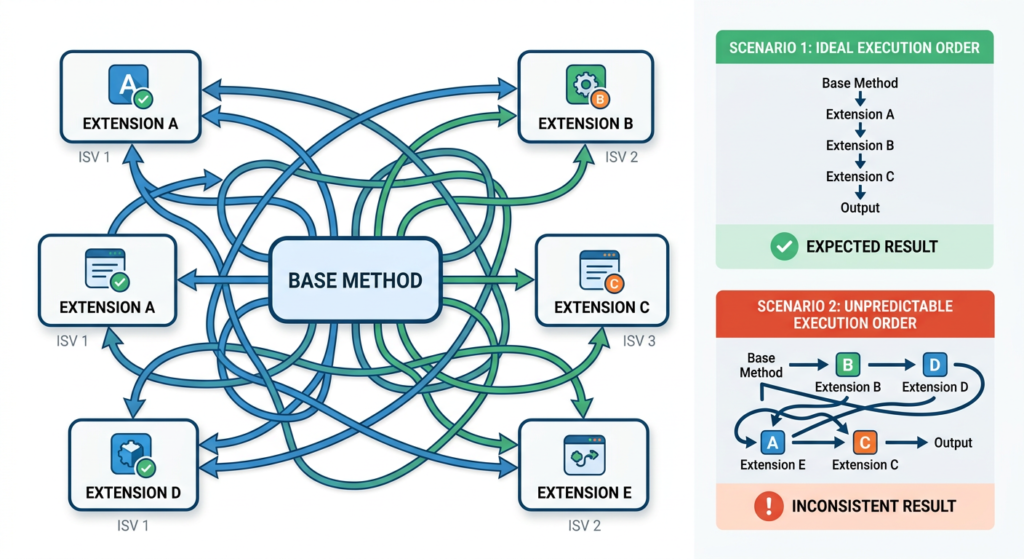
The single most common extensibility bug on multi-ISV tenants — and the one hardest to reproduce locally. Microsoft’s documentation is explicit on two fronts: CoC extensions run in random order, and subscribers to the same publisher have “no way of specifying the sequence in which subscribers are called”. Both statements are on Microsoft Learn today.
The failure mode is almost always the same: a developer writes an extension that assumes state set by an earlier extension will be available, or that it will run “before” or “after” a known competitor’s extension. It works in their sandbox because no other extensions are present. It fails intermittently in a tenant with multiple ISVs, because the runtime picks a different order on different invocations.
Fix: design every extension to be order-independent. If your logic genuinely depends on ordering — a rare legitimate case — move it to a published delegate where the event is explicitly raised at a known point in the base flow, or restructure the design so both behaviours run from the same extension. Never ship code that works “usually.”
2. Trusting XppPrePostArgs.getArg() as if it were compile-safe
Pre and Post handlers pull their arguments from an XppPrePostArgs collection, keyed by string:
FieldId fieldId = _args.getArg("_fieldId"); That string is not validated at compile time. If Microsoft renames the parameter in a future service update — or if the method signature changes in any way — your code still compiles, still deploys, and silently fails at runtime. You either get a null value or the wrong argument, and because everything looks fine in a build log, the regression only surfaces when something downstream breaks.
Microsoft itself warns about this on the Events and delegates reference page: “Pre and Post handlers can easily break as the result of added or removed parameters, changed parameter types, or because methods are no longer called, or called under different circumstances.” That’s the authoritative source telling you, in their own documentation, that this pattern is fragile.
Fix: prefer CoC for method-level overrides when feasible. CoC signatures are validated at compile time — a renamed parameter breaks your build instead of your production. When you must use a Pre/Post handler (because CoC isn’t available), at minimum add a code comment naming the argument keys you depend on, so the next consultant maintaining the code knows what to check against the current base method.
3. Wrapping hot-path methods without measuring
CoC’s overhead per call is small. That’s almost always irrelevant — and occasionally catastrophic. The distinction is the call frequency. A CoC extension on SalesTable.validateWrite() fires on every save: maybe a few thousand times a day. Fine. A CoC extension on a method inside a settlement loop, a posting flow, or an inventory-close calculation can fire tens or hundreds of thousands of times in a single batch run. Not fine.
Jayaprakash C’s 2025 writeup on optimizing Ledger Journal posting in D365 F&O (Medium, linked below) is a current example of this class of problem: a posting flow that was consuming over 40% of the transaction log footprint due to sequential, unoptimized extension patterns. The fix wasn’t removing customization — it was restructuring around Microsoft’s own multi-post and parallel-posting utilities. The lesson generalizes: extensions in posting paths need to be treated as performance-sensitive code.
Fix: before wrapping anything in an inventory, settlement, or posting flow, instrument it. Application Insights integration with F&O is a native, first-class capability — Alex Meyer’s telemetry FAQs document that a custom telemetry event costs about 1 millisecond to emit because the architecture is asynchronous. That’s cheap enough to sprinkle liberally during load testing. Measure before you ship, not after the client opens a ticket about month-end taking three hours longer than it used to. ⚠ Telemetry setup itself requires enabling the Monitoring and Telemetry feature in Feature Management and connecting an Azure Application Insights resource; verify it’s enabled in your tenant before relying on it.
4. Carrying forward mental models that used to be true
Extensibility in modern F&O has a different ruleset than it did in earlier generations of the product. Several techniques that were standard practice — overlayering Microsoft source, adding [Hookable(true)] to a protected method so you could subscribe to it, direct source modification — are either unsupported now or are actively the wrong approach.
The most common manifestation: a consultant adds an overlayer workaround to expose a protected method, and the code works. It builds, it deploys, it runs. The problems are invisible until a service update breaks the assumption, or until someone tries to apply the package on a tenant where overlayering isn’t permitted. The correct answer today is almost always one of: use CoC (which accesses protected members natively — documented on the method-wrapping page), find a Microsoft-published delegate, or refactor to depend only on public surface.
Fix: when you see a workaround in existing code that relies on overlayering or Hookable toggles, flag it for replacement. Don’t replicate the pattern in new code, even if the old code still compiles. Every instance is a future-brittleness bet you don’t need to make.
5. Breaking the next call contract in CoC — and not realizing it
The next call in a CoC extension isn’t optional decoration — it is the contract that keeps the chain of wrappers working. Microsoft’s method-wrapping documentation is explicit: calls to next cannot be made conditionally inside an if, cannot appear inside loops (while, do-while, for), cannot be preceded by a return, and cannot appear inside logical expressions (because of short-circuit optimization).
The failure here is more subtle than pitfall #1. The compiler enforces the structural rule — you physically can’t put next inside a for loop. What developers do instead is skip the next call entirely, or wrap logic in a way that conditionally bypasses the rest of the chain. Both break other extensions in the same chain. Both build. Both pass basic testing. Both fail when a second ISV’s extension stops firing on the same method and the vendor can’t reproduce it.
Fix: call next unconditionally, at the top level of the method body, exactly as Microsoft specifies. The only legitimate exceptions are methods marked [Replaceable] (where skipping next is a supported design decision) and — since the structural rule was loosened — wrapping the call in try/catch/finally. Everything else fights the framework, and the framework wins.
3 tricky interview questions (with verified answers)
Same format as earlier posts. Each answer traces to a named, linked source.
Q1. Your extension passes all tests in UAT but breaks only in production. What are the three most likely causes?
Strong answers cover three independent axes. First, order-dependence — UAT may only have your extension on the method, while production has multiple ISVs wrapping the same method, and the non-deterministic call order surfaces in the larger environment. Second, data volume — UAT typically runs on a small dataset, and extensions on posting/settlement/close paths only reveal performance problems at production scale (the Ledger Journal optimization case referenced above is a textbook example). Third, environment configuration drift — telemetry enabled or disabled, feature flags on in one tenant and off in the other, different platform service-update levels between UAT and production. A candidate who names only one of these has a narrower mental model than the role demands.
Q2. Given a Post handler that reads an argument via _args.getArg(“_custAccount”), what could make this silently return a wrong value after a service update?
The argument key is a string, not a compile-time reference, so three things can break it silently: a rename of the parameter in the base method (“_custAccount” → “_accountNum”, for example), a change in parameter type that still resolves to a compatible X++ type at call time, or the base method being replaced by a wrapper that no longer calls the original with the same arg shape. The Microsoft Learn Events and delegates page explicitly lists these failure modes. The mitigation — and this is the answer an interviewer is listening for — is to prefer CoC when overriding method-level logic, because the signature is bound at compile time. The _args.getArg pattern is the right one only when CoC isn’t an option.
Q3. Before wrapping a standard F&O method with CoC, what three attributes should you check on the base method?
Three, all documented on Microsoft Learn’s class extension reference page: [Hookable(false)] — the method is completely sealed; neither CoC nor Pre/Post handlers will bind. [Wrappable(false)] — CoC is blocked specifically, though Pre/Post handlers may still work. [Replaceable] — CoC is permitted and the compiler will not force you to call next, meaning you can legitimately override the base entirely. Also worth noting in an interview: [Hookable(true)] applies only to pre/post handlers and does not enable CoC wrapping — a common trap. A candidate who confuses these four attributes usually hasn’t read the method-wrapping page recently.
What to actually do
- Review every extension in your solution for implicit ordering assumptions. If an extension reads state set elsewhere, it’s a candidate for failure.
- Grep your codebase for _args.getArg calls. Each one is a string-based coupling to a base method. For each, ask: could this be refactored to CoC? If yes, refactor it.
- Before adding CoC on any method in a posting, settlement, or batch flow, enable Application Insights in a test environment and instrument the method to measure baseline call frequency and duration.
- When you encounter overlayering or Hookable-toggle workarounds in existing code, don’t replicate the pattern in new work. Note them for replacement.
- In code reviews, verify that every CoC extension calls next unconditionally at the top level — unless the method is explicitly [Replaceable] and the decision to skip next is documented in a comment.
References
- Microsoft Learn — Class extension: Method wrapping and Chain of Command (learn.microsoft.com/en-us/dynamics365/fin-ops-core/dev-itpro/extensibility/method-wrapping-coc). Authoritative reference for CoC rules, the next-call contract, and the Hookable/Wrappable/Replaceable attribute semantics in pitfalls 4 and 5.
- Microsoft Learn — Events and delegates (learn.microsoft.com/en-us/dynamics365/fin-ops-core/dev-itpro/dev-ref/xpp-events). Source for pitfall 2 and Q2 — specifically Microsoft’s own warning that Pre/Post handlers “can easily break as the result of added or removed parameters.” Last updated February 2025.
- Jayaprakash C — Optimizing Ledger Journal Posting in D365 F&O (medium.com/@jayaprakashc079, March 2025). Current case study showing how posting-flow extensions can become performance bottlenecks at production scale, and how to restructure using standard multi-post utilities. Source for pitfall 3.
- Alex Meyer — D365FO Telemetry Data FAQs (alexdmeyer.com/2025/03/19/d365fo-telemetry-data-faqs/). Authoritative community source on the native Application Insights integration, the asynchronous telemetry architecture, and the ~1ms cost of emitting a custom telemetry event. Source for the pitfall 3 mitigation approach.
- Prodware — Monitoring and Telemetry in D365 F&O with Application Insights (blog.prodwaregroup.com, August 2025). Step-by-step for enabling the Monitoring and Telemetry feature and connecting an Application Insights instance. Supporting reference for pitfall 3.
Next up in this series: Form Extensions in D365 F&O — Data Sources, Controls, and the Gotchas Nobody Warns You About . Back to a tactical deep-dive.
