
Reading time: ~9 minutes.
Most table customization in D365 F&O is one of two things: you’re adding a field, or you’re changing how the table behaves on insert, update, validate, or delete. The decision sounds simple — table extension for fields, CoC for logic — and that’s the right shape of the answer. The real question is what to do at the seams. Where does the logic that fills your new field live? When does CoC win, when does it lose to a data event handler? When is the answer actually “a new table, not an extension”?
This post is the practitioner’s version of that decision. No syntax tutorial — Microsoft Learn covers that. The decision framework is what’s missing from the docs.
If you haven’t read the foundation posts: CoC mechanics here Chain of Command in D365 F&O, events vs CoC here Event Handlers vs Chain of Command.
The two things you can do with a table extension
Microsoft’s customization-overlayering-extensions reference is precise about what a table extension is and what it isn’t. A table extension can:
- Add new fields, field groups, indexes, mappings, and relations
- Add new fields to existing field groups
- Change the label of a table field
- Change the Created By, Created Date Time, Modified By, and Modified Date Time properties
- Change the Extended Data Type property on fields, set it to an EDT derived from the current EDT — this has been available since Platform Update 8
That’s the metadata side. None of these are method overrides. None of them are CoC. A table extension is a metadata change to the table itself — what fields exist, what they’re called, what type they hold.
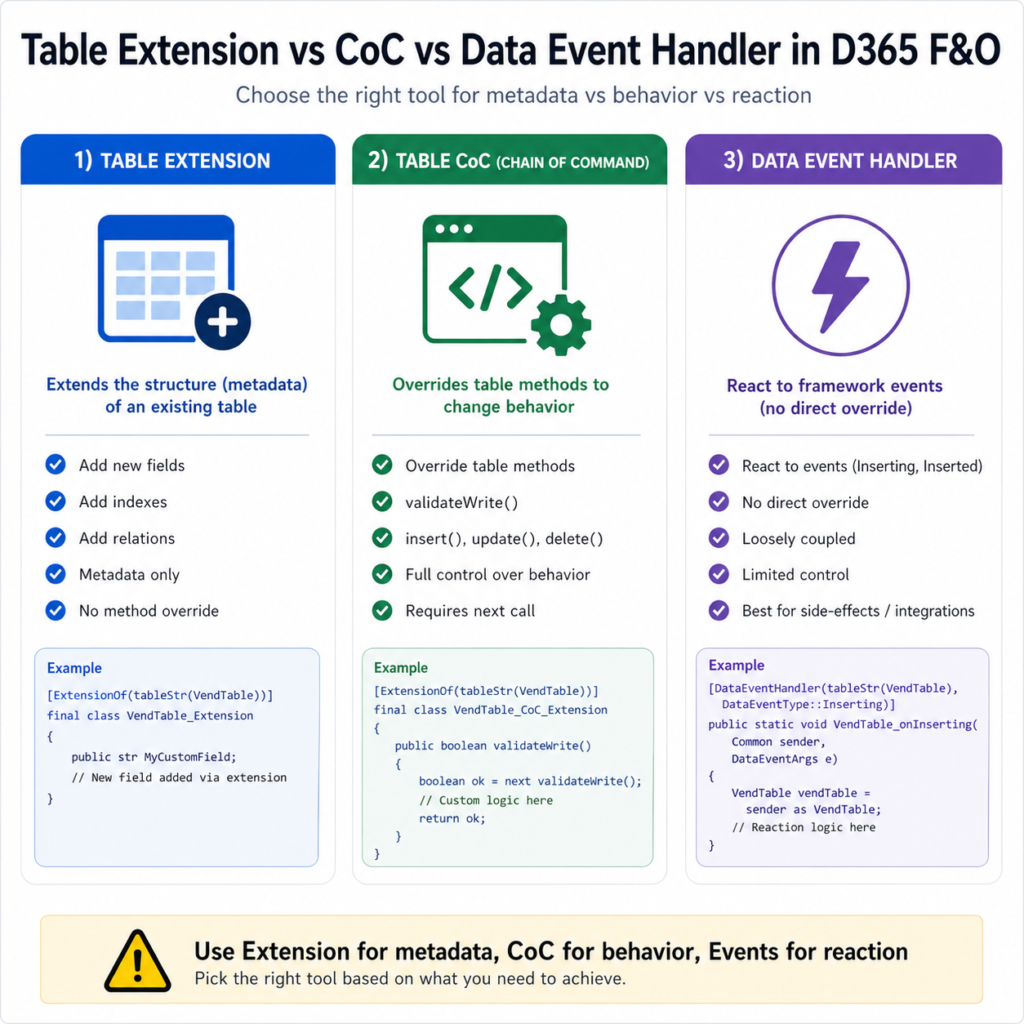
Method behaviour is a different mechanism. To change what happens when the table is inserted, updated, validated, or deleted, you write a CoC class on the table:
[ExtensionOf(tableStr(VendTable))]
final class VendTable_MyExt_Extension
{
    public boolean validateWrite()
    {
        boolean ok = next validateWrite();

        if (!ok) return ok;

        if (this.MyCustomRefId == '')
        {
            return checkFailed("@MyExt:RefIdRequired");
        }

        return true;
    }
}
The pattern above follows Forrest Zhang’s VendTable.validateWrite() example on hellosmart.ca — clean current code, no AX-era residue. The key thing to notice: the MyCustomRefId field doesn’t exist on the base VendTable. It exists because of a separate table extension that added it as metadata. Two artifacts, two responsibilities. Both required.
Where the new field’s default value gets initialized — and why it matters
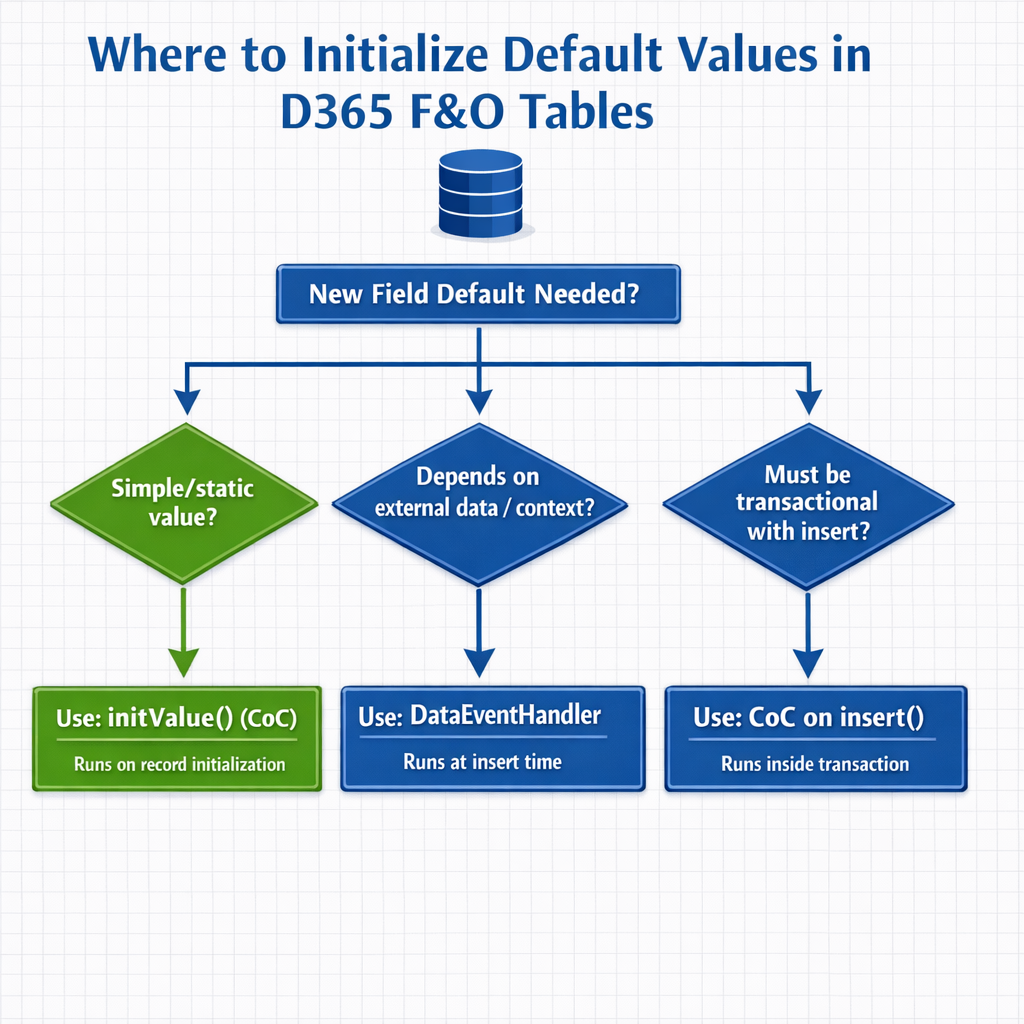
This is the seam that catches people. You added a field via table extension. You added validateWrite logic via CoC. Now you need that field to have a sensible default value when a new record is created. Where does that logic live?
There are three plausible places, and they have different consequences.
Option A: CoC on the table’s initValue() method. Wraps the standard table method that gets called when a new record is initialized in memory. Cleanest answer for most cases. The default lives where developers look for it.
Option B: A data event handler on Inserting. Microsoft’s documented pattern in their “Add methods to tables through extension” reference uses exactly this approach: a method on a table-augment class fills the new field, called from a DataEventHandler on OnInserting. This works, and is the right answer if the default depends on data that isn’t available until the insert path is reached.
Option C: CoC on insert(). Now that table CoC supports kernel-implemented methods, you can wrap insert() directly. Use this when you need transactional logic — operations that must be in the same transaction as the row insert itself.
The decision rule:
- If the default is a static value or simple expression based on the record itself — use initValue() CoC.
- If the default depends on lookups or context that’s only available at the point of insert — use a DataEventHandler on Inserting, as Microsoft’s reference shows.
- If the default’s calculation must be transactional with the insert — wrap insert() with CoC.
Reaching for the wrong option works in UAT and gets weird in production. Initializers that needed to be transactional but were placed on initValue can run before the values they depend on are set. Initializers that should have been on initValue end up duplicated across every insert path. Choose deliberately.
validateField vs validateWrite vs modifiedField — the three confusable methods
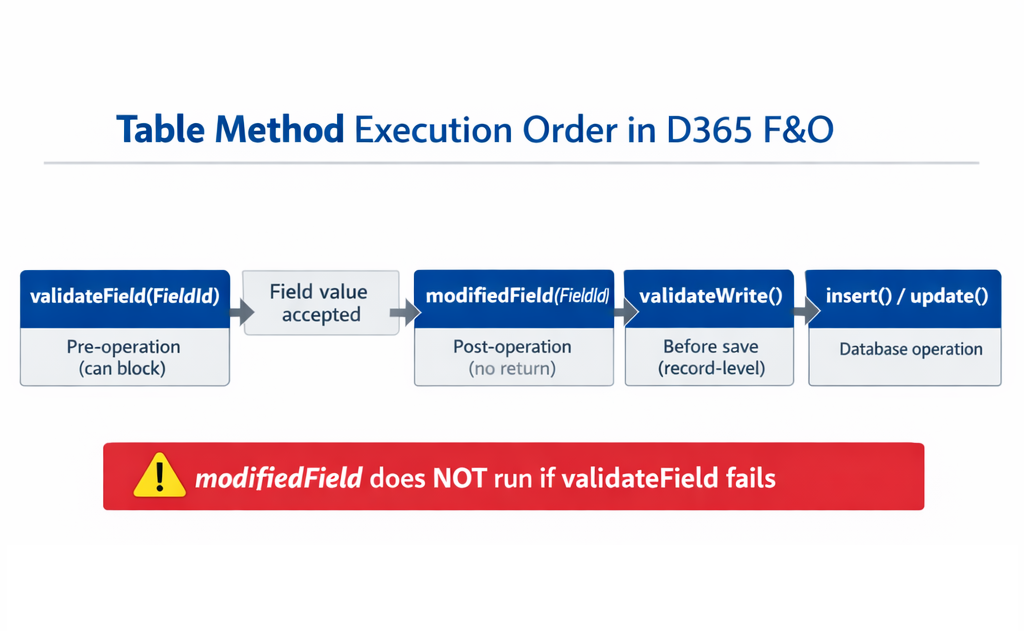
These three table methods get conflated all the time. The distinctions matter, especially when you’re CoC-wrapping them.
validateField(FieldId) — pre-operation, field-level. Called before a single field’s change is accepted. Returns boolean. Returning false blocks the change. As Forrest Zhang’s hellosmart.ca writeup notes, “validateField is pre-operation: It checks if a field’s new value is valid before allowing the change.” Use for field-by-field validation that should reject the change at the keystroke level.
modifiedField(FieldId) — post-operation, field-level. Called after a field’s change is accepted. No return value. Use for cascading recalculations of dependent fields. Same source: “If validateField fails, modifiedField never triggers.” That ordering matters when you’re chaining logic across the two.
validateWrite() — pre-operation, record-level. Called before the record is saved. Returns boolean. Returning false blocks the save. Use for cross-field validation rules that can only be evaluated against the full record.
There is no validateCreate(). Forrest Zhang flagged this directly: use validateWrite for create-or-update validation, use insert() CoC for create-only logic. People look for validateCreate, get confused when they don’t find it, and end up rewriting validation in three places.
When a table extension is the wrong answer — the field-count problem
This is the rough paragraph. There’s a soft limit on how many fields you should add to a table via extension before the right answer flips to a separate table joined by relation.
D365 Smart’s writeup on the table extension framework notes a guideline of 10 fields per extension before you’re encouraged to consider a separate table. The exact number is less important than the underlying reason: every extension field on a Microsoft OOB table becomes a real database column on the actual table. Add fifty fields to InventTable via extension and you’ve fattened the most-joined table in the system. Performance regressions from this are not theoretical.
The decision flow:
- Adding 1–3 fields with no other ISV churn on the same table — table extension, no concerns.
- Adding 4–10 fields, all closely related to the table’s core purpose — table extension, monitor query plans on the table after deployment.
- Adding more than 10 fields, or fields that represent a different concern (audit metadata, integration tracking, custom workflow state) — strongly consider a separate table joined by relation. The base table stays narrow; the extension data lives where it belongs.
When you go the separate-table route, you’ll typically have a write() CoC on the form data source ensuring the related table inserts/updates alongside the parent. Chaitu’s 2020 walkthrough on this pattern is the canonical example, though the version-specific details on packed extensions in that post are now standard library functionality and can be ignored.
Decision matrix: table extension vs table CoC vs data event handler
| What you want to do | Table extension | Table CoC | Data event handler |
| Add a new field to a Microsoft OOB table | Yes | No | No |
| Add a new index, relation, or field group | Yes | No | No |
| Initialize a default value on a new record | No | Yes — initValue() | Yes — Inserting |
| Field-level validation that blocks the change | No | Yes — validateField() | Limited |
| Record-level validation before save | No | Yes — validateWrite() | No |
| Cascading recalculation when a field changes | No | Yes — modifiedField() | No |
| Push a message to integration queue on insert | No | Yes — insert() | Yes — Inserted |
| Logic that must be in same transaction as insert/update | No | Yes | No — different scope |
| Add 30+ fields with distinct concerns | Reconsider | N/A | N/A |
3 tricky interview questions (with verified answers)
Q1. There’s no validateCreate() on tables. How do you implement create-only validation?
Two layered answers, both correct: use validateWrite() for general create-or-update validation, and CoC on insert() for logic that must run only on creation. Forrest Zhang’s hellosmart.ca writeup states the rule directly: “Is there validateCreate()? No. Use validateWrite() for create/update; use CoC on insert() for create-only logic.” A senior candidate adds the nuance that validateWrite() is called from both the create and update paths, so checking this.RecId == 0 inside it is the idiomatic way to gate create-only checks without splitting the logic across two methods.
Q2. What’s the difference between validateField and modifiedField, and what’s the gotcha when you wrap both?
validateField is pre-operation and returns boolean — false blocks the change. modifiedField is post-operation and has no return value. The gotcha when you CoC both: modifiedField never fires if validateField returns false. So if your modifiedField logic is the cascading-recalc you depend on, and your validateField rejects the change for any reason, the recalc silently doesn’t happen. This isn’t a bug in your CoC — it’s the documented behaviour. Design accordingly: validateField and modifiedField extensions should be coordinated, especially when one is providing the input the other depends on.
Q3. Why is CoC the recommended approach over event handlers for table-method customization, even though both compile?
Two technical reasons documented across Microsoft Learn and current community sources. First, kernel-implemented table methods (insert(), update(), delete(), doInsert()) cannot be reached by traditional event handlers — they don’t expose the events that pre/post handlers need. d365ffo.com states this directly: “event handlers in D365FO are designed to respond to events triggered by classes, forms, and controls. However, table methods such as insert(), update(), and delete() do not expose events that can be intercepted by traditional event handlers.” Second, CoC’s signature is compile-time-bound, while event handlers using XppPrePostArgs.getArg(“_paramName”) carry the same brittleness Microsoft warned about in the events reference (see Day 2). The community-current consensus, reflected in Dynamics Edge’s 2025 fundamentals writeup: CoC is the preferred approach for method-logic overrides on tables; event handlers remain valid for Inserting/Inserted-style framework events where they’re the natural fit.
What to actually do
- For metadata changes (fields, indexes, relations) — table extension. Always.
- For method-level behaviour changes — CoC on the table. Default. Pick the right method (initValue, validateField, validateWrite, modifiedField, insert, update, delete) based on the operation phase you’re hooking.
- For react-to-event work that doesn’t override behaviour — DataEventHandler. Same logic as Day 2’s distinction between method overrides and framework events.
- For more than ~10 new fields with distinct concerns — separate table joined by relation. The OOB table stays narrow.
- Coordinate validateField and modifiedField extensions deliberately. The rejection-blocks-modification chain is documented and easy to be surprised by.
References
- Microsoft Learn — Customize through extension and overlayering (learn.microsoft.com/en-us/dynamics365/fin-ops-core/dev-itpro/extensibility/customization-overlayering-extensions). Authoritative reference for what a table extension can and can’t do; lists fields, field groups, indexes, mappings, relations, label changes, and EDT-derived type changes. Last updated March 2026.
- Microsoft Learn — Add methods to tables through extension (learn.microsoft.com/en-us/dynamics365/fin-ops-core/dev-itpro/extensibility/add-method-table). Documented pattern for combining a table-augment class method with a DataEventHandler on Inserting — the basis for Option B in the field-default decision.
- Microsoft Learn — Add fields to tables through extension (learn.microsoft.com/en-us/dynamics365/fin-ops-core/dev-itpro/extensibility/add-field-extension). Step-by-step current reference for adding fields via extension.
- Forrest Zhang / hellosmart.ca — Understanding Table Methods and Transactions in D365 F&O (hellosmart.ca, September 2025). Source for the validateField/modifiedField ordering rule and the validateCreate clarification used in Q1 and Q2. Current code, current platform, no AX-era residue.
- d365ffo.com — Extending the InventSum Table Methods in D365FO: Using Chain of Command Instead of Event Handlers (November 2024). Source for Q3 — explicit on why event handlers don’t reach kernel-implemented table methods.
- Dynamics 365 Musings — Chain Of Command For Table Methods in D365 (dynamics365musings.com/chain-of-command-table-methods/). Practical CoC patterns for table methods. Current source.
- Dynamics Edge — Chain of Command D365 Fundamentals Training (2025 edition). Useful current confirmation that CoC is now the preferred approach for table-method customization on supported platform versions.
Next up in this series: Delegates in X++ — The Underused Pattern for Clean Extensibility.
